In this tutorial you will learn how to tune WildFly application server and the supported version of it which is JBoss Enterprise Application Platform (EAP) 7.
Tuning JBoss/WildFly application server is a complex thing. As a matter of fact, there are several areas you need to cover:
- Tuning the application server subsystems
- JVM Tuning
- Infrastructure Optimization (OS / Network / Database)
In the first article of this series we will cover how to tune the core application server subsystems. You can refer to the articles in the link to know more about the other aspects.
To learn how to optimize the Linux Operating system for Java applications check this article: Tuning Java applications on Linux
Tuning the Application Server
Although many architects and software engineer agree that the application performance depends on how you are coding the application, a poorly configured server environment can affect your performance significantly. The number of subsystems which are in JBoss / WildFly is quite extensive. However, the following ones are a good candidates in a performance tuning analysis:
- DataSource tuning
- EJB Connection pool Tuning
- Logging Tuning
- Web Server Tuning
- JPA Cache tuning
- Messaging Tuning
Let’s cover these aspects in detail.
How to optimize the Database connection pool
Establishing a JDBC connection with a DBMS can be quite slow. Therefore, if you are repeatedly opening and closing connections you can experience a significant performance issue. The Database connection pool in WildFly offers an efficient solution to this problem.
What is important to stress out is that, when a client closes a connection from a data source, the connection returns to the pool and becomes available for other clients. Therefore, the Socket connection itself is not closed.
In the following example, we are adding into a datasource configuration a pool configuration:
<datasource jndi-name="MySqlDS" pool-name="MySqlDS_Pool"
    enabled="true" jta="true" use-java-context="true" use-ccm="true">
    <connection-url>
        jdbc:mysql://localhost:3306/MyDB
    </connection-url>
    <driver>mysql</driver>
    <pool>
        <min-pool-size>10</min-pool-size>
        <max-pool-size>30</max-pool-size>
        <prefill>true</prefill>
    </pool>
    <timeout>
        <blocking-timeout-millis>30000</blocking-timeout-millis>
        <idle-timeout-minutes>5</idle-timeout-minutes>
    </timeout>
</datasource>
Here, we are configuring an minimum pool capacity (min-pool-size) of ten connections which can grow up to thirty (max-pool-size) . As you can see from the following MySQL administration console, when you set the pre-fill element to true, the application server attempts to pre-fill the connection pool at the start-up. This can produce a performance hit, especially if your connections are costly to acquire.
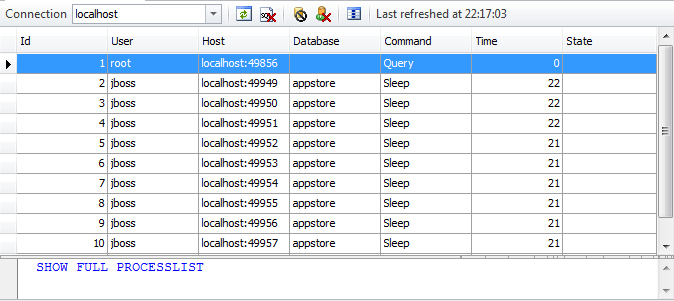
If the application server is not able to serve any more connections because they are all in use, then it will wait up to the blocking-timeout-millis before throwing an exception to the client.
At the same time, connections which have been idle for some minutes over the parameter idle-timeout-minutes, they are forced to return to the pool.
Adjusting the pool size
Firstly, to determine the proper sizing, you need to monitor your connection usage. You can do that several ways. For example, from the CLI you can monitor the runtime properties of your datasource. Here’s an example output:
/subsystem=datasources/data-source="java:/MySqlDS":read-resource(include-runtime=true)
{
"outcome" => "success",
"result" => {
"ActiveCount" => "10",
"AvailableCount" => "29",
"AverageBlockingTime" => "0",
"AverageCreationTime" => "56",
"CreatedCount" => "10",
"DestroyedCount" => "0",
"MaxCreationTime" => "320",
"MaxUsedCount" => "5",
"MaxWaitCount" => "0",
"MaxWaitTime" => "1",
. . . .
}
}
The output of this command is quite verbose. However, here are the top picks:
- ActiveCount: displays the amount of connections which are currently active.
- MaxUsedCount which is the peak of connections reached by the application.
Beware: if you are prefilling the pool, these connection will appear as Active. This could be misleading and lead you to assume they are actually busy.
Next, if your MaxUsedCount approaches the max-pool-size you should investigate which are the Statements taking more time.
In order to trace the single SQL Statements you can use some additional options in your datasource as you can read from here: How to trace JDBC statements with JBoss and WildFly
Finally, only after your SQL analysis, you should to increase the max-pool-size. A good rule of thumb is to find the peak usage of connections and set the maximum at least 25-30% higher.
On the other hand, your server logs are still an invaluable help to check if your pool is running in trouble. For example, if you start seeing this exception in your server logs, there is a strong clue that you need to look at your connection pooling:
21:57:57,781 ERROR [stderr] (http-executor-threads - 7) Caused by: javax.resource.ResourceException: IJ000655: No managed connections available within configured blocking timeout (30000 [ms])
21:57:57,782 ERROR [stderr] (http-executor-threads - 7)         at org.jboss.jca.core.connectionmanager.pool.mcp.SemaphoreArrayListManagedConnectionPool.getConnection
Useful DB Commands
If you are not able to use the CLI or simply you want to make good use of your DBA certification there are some valid alternative as well: the first and most obvious is monitoring the database sessions. The following table shows some useful commands, which can be used to keep track of active database connections on different databases:
| Database | Command / Table |
| Oracle | Query the V$SESSION view |
| MySQL | Use the command SHOW FULL PROCESSLIST |
| Postgre-SQL | Query the PG_STAT_ACTIVITY table |
Tuning the EJB connection pool
The creation and destruction of EJB can be an expensive operation, especially if they acquire external resources. To reduce this cost, The EJB container creates pool of Stateless Beans and Message Driver Beans. By default, the following settings apply:
- Stateless Session Beans derive their size from the IO worker pool. The IO worker pool size in turn derives from the io system resources.
- Message Driven Beans derive their size from the number of CPU. The exact formula is 4 * CPU CORES
For example, this is the default configuration:
<pools>
    <bean-instance-pools>
        <strict-max-pool name="mdb-strict-max-pool" derive-size="from-cpu-count" instance-acquisition-timeout="5" instance-acquisition-timeout-unit="MINUTES"/>
        <strict-max-pool name="slsb-strict-max-pool" derive-size="from-worker-pools" instance-acquisition-timeout="5" instance-acquisition-timeout-unit="MINUTES"/>
    </bean-instance-pools>
</pools>
Finding the optimal pool size
Once that you have configured your Pool of beans, it is time to monitor if your configuration is appropriate. As for other subsystems, you need to activate statistics in order to check them:
/subsystem=ejb3:write-attribute(name=enable-statistics,value=true)
Next, we will need to check the specific SLSB or MDB after a load test to gather runtime statistics:
/deployment=myapp.jar/subsystem=ejb3/stateless-session-bean=DemoEJB/:read-resource(recursive=false,include-runtime=true,include-defaults=false)

{

    "outcome" => "success",
    "result" => {
        "component-class-name" => "ManagerEJB",
        "declared-roles" => [],
        "execution-time" => 0L,
        "invocations" => 18L,
        "methods" => {},
        "peak-concurrent-invocations" => 2L,
        "pool-available-count" => 20,
        "pool-create-count" => 5,
        "pool-current-size" => 2,
        "pool-max-size" => 20,
        "pool-name" => "slsb-strict-max-pool",
        "pool-remove-count" => 0,
        "run-as-role" => undefined,
        "security-domain" => "other",
        "timers" => [],
        "wait-time" => 0L,
        "service" => undefined
    }
}
You should capture values of the pool-current-size at regular intervals to determine the trend of your EJB pool under load. Another important indicator is the peak-concurrent-invocations which summarizes in a single value what was the highest load for the EJB pool.
If you see that the peak-concurrent-invocations is equal to the pool-max-size, then it is likely that you need to increase the size of your pool. You will probably find a positive value for the wait-time metric so check your logs to see if some requests have failed to be served. For example:
javax.ejb.EJBException: JBAS014516: Failed to acquire a permit within 20 SECONDS
         at org.jboss.as.ejb3.pool.strictmax.StrictMaxPool.get(StrictMaxPool.java:109)
Focus on MDB
When you set the mdb-max-pool, make sure its value is greater or equal to the value of maxSession.
The maxSession attribute determines the maximum number of JMS sessions that the JCA Resource Adapter can concurrently deliver messages to the MDB Pool.
@ActivationConfigProperty( propertyName = "maxSession", propertyValue = "20")
If maxSession is greater than mdb-max-pool there will be idle sessions since there will not be enough MDBs to service them.
Tuning Web server thread pool
WildFly uses Undertow as Web Server where you can run your applications. Each Undertow server, includes a set of http/https listeners. For example:
<server name="default-server">
    <http-listener name="default" socket-binding="http" redirect-socket="https" enable-http2="true"/>
    <https-listener name="https" socket-binding="https" ssl-context="demoSSLContext" enable-http2="true"/>
    <host name="default-host" alias="localhost">
        <location name="/" handler="welcome-content"/>
        <http-invoker http-authentication-factory="application-http-authentication"/>
    </host>
</server>
Each listener, in turn, uses a Worker thread. For example:
/subsystem=undertow/server=default-server/http-listener=default:read-attribute(name=worker)
{
    "outcome" => "success",
    "result" => "default",
}
The configuration of the worker is not into undertow but into the io subsystem:
<subsystem xmlns="urn:jboss:domain:io:3.0">
    <worker name="default"/>
    <buffer-pool name="default"/>
</subsystem>
You can see more details about the worker attribute with the following query from the CLI:
/subsystem=io/worker=default:read-resource
{
    "outcome" => "success",
    "result" => {
        "io-threads" => undefined,
        "stack-size" => 0L,
        "task-keepalive" => 60,
        "task-max-threads" => undefined
    }
}
Focus on the Worker attributes
When the worker attributes is undefined it simply means that the io worker defaults derive from the numbers of cpus. To be precise, io-threads defaults to number of:
(logical cpus * 2)
On the other hand, task-max-threads is set to:
(number of cpus * 16)
More in detail:
- The io-threads corresponds to the number of IO threads to create. These threads are shared between multiple connections therefore they mustn’t perform blocking operations as while the operation is blocking, other connections will essentially hang. One IO thread per CPU core is a reasonable default for a simple system.
- The task-max-threads corresponds to the maximum number of workers allowed to run blocking tasks such as Servlet requests. Its value depends on the server workload. Generally, this should be reasonably high, at least 10 * CPU core.
- The stack–size corresponds to the Web server Thread stack size. With a larger Thread stack size, the Web server will consume more resources, and thus fewer users can be supported.
- The task-keepalive (default 60) controls the number of seconds to wait for the next request from the same client on the same connection. With Keep-Alives the browser gets to eliminate a full round trip for every request after the first, usually cutting full page load times in half.
Tuning the Web server pool, however, requires knowledge of the external systems metrics (such as Databases or other EIS). Therefore, you should consider the full picture to find optimal values for your Web Server pool. The following article covers a typical Request flow which passes through several layers: Undertow and EJB Performance Tuning
Logging tuning
Logging is an essential activity of every applications, however the default configuration is generally appropriate for development, but not for a production environment.
The key elements which you need to consider when switching to production are:
1. Choosing the appropriate handler to output your logs.
2. Choose a log level which provides just the amount of information you need and nothing else.
3. Choose an appropriate format for your logs
As far as it concerns, log handlers, in the default configuration, both console logging and file logging are enabled. While this can be fine for development, using console logging in production is an expensive process which causes lots of un-buffered I/O. While some applications maybe fine with console logging, high-volume applications benefit from turning off console logging and just using the FILE handler.
In order to remove console logging, you can simply comment out its handler:
<root-logger>
  <level name="INFO"/>
   <handlers>
     <!--   <handler name="CONSOLE"/> -->
   <handler name="FILE"/>
  </handlers>
</root-logger>
Next step is choosing the correct logging verbosity. Obviously, the less you log, the less I/O will occur, and the better your overall application. The default configuration uses the “INFO” level for the root logger. You could consider raising this to an higher threshold like “WARN” or (using a fine grained approach) changing the single logging categories
<logger category="org.hibernate">
  <level name="WARN"/>
</logger>
In this example, we have just raised the log level for org.hibernate package to “WARN” which will produce a much more concise information from Hibernate.
Tune Log Patterns
Finally, also the Log Pattern Format can influence the performance of your applications. For example, let’s take the default pattern format, which is:
<formatter name="PATTERN">
    <pattern-formatter pattern="%d{yyyy-MM-dd HH:mm:ss,SSS} %-5p [%c] (%t) %s%e%n"/>
</formatter>
Starting from this basic format, with as little as adding the flag %l, you can greatly enhance the verbosity of your logs by printing the line number and the class that emitted the log. Here is the output:
While this information can be quite useful in development, it will result in a huge burden when running in production.
The other flags which can have a negative impact on your logging performance are:
- %C: prints the Caller class information
- %M: outputs the logging method
- %F prints the filename where the logging request was issued.
Infinispan Cache tuning
Most performance issues in Enterprise applications arise from data access, hence caching data is one of the most important tuning techniques.
The current release of the application server uses Infinispan as distributed caching provided and you can use it to cache anything you like.
In particular, you can use it as second-level caching provider by adding the following configuration in your persistence.xml file:
<shared-cache-mode>ENABLE_SELECTIVE</shared-cache-mode>
<properties>

 <property name="hibernate.cache.use_second_level_cache" value="true"/>
 <property name="hibernate.cache.use_minimal_puts" value="true"/>
</properties>
Second-level caching is intended for data that is read-mostly. It allows you to store the entity and query data in memory so that this data can be retrieved without the overhead of returning to the database.
On the other hand, for applications with heavy use of write operations, caching may simply add overhead without providing any real benefit.
In order to cache entities, you can use the @javax.persistence.Cacheable in conjunction with the shared-cache-mode element of persistence.xml. When you have enabled a selective cache of your entities, the @Cachable annotation will load entities into the Hibernate second-level cache.
If you want to monitor the cache statistics, you can use the following property in your persistence.xml file, which will expose the cache statistics via JMX. For example:
<property name="hibernate.cache.infinispan.statistics" value="true"/>
Monitoring your Infinispan Cache
A very simple way to check the WildFly MBeans is starting the JConsole application and choosing the Mbeans tab in the upper area of the application:
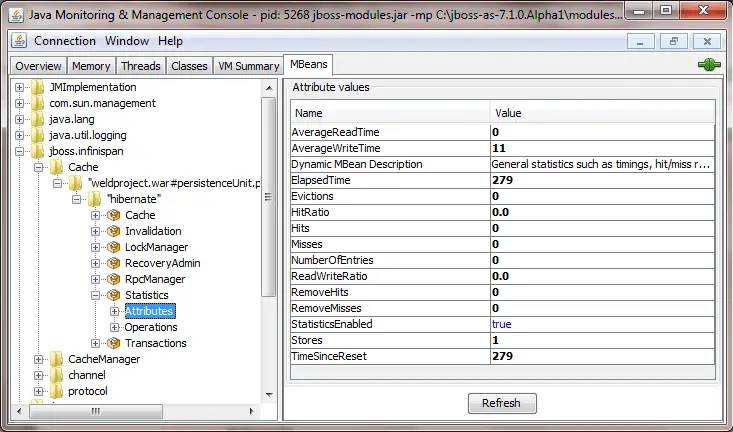
The following table describes synthetically the meaning of the Infinispan cache statistics:
| Attribute | Description |
| Evictions | Number of cache eviction operations |
| RemoveMisses | Number of cache removals where keys were not found |
| ReadWriteRatio | Read/writes ratio for the cache |
| Hits | Number of cache attribute hits |
| NumberofEntries | Number of entries currently in the cache |
| StatisticsEnabled | Enables or disables the gathering of statistics by this component |
| TimeSinceReset | Number of seconds since the cache statistics were last reset |
| ElapsedTime | Number of seconds since cache started |
| Misses | Number of cache attribute misses |
| RemoveHits | Number of cache removal hits |
| AverageWriteTime | Average number of milliseconds for a write operation in the cache |
| Stores | Number of cache attribute put operations |
| HitRatio | Percentage hit/(hit+miss) ratio for the cache |
| AverageReadTime | Average number of milliseconds for a read operation on the cache |
Evicting Cache Data
Evicting data from the cache is also fundamental in order to save memory when cache entries are not needed anymore. You can configure the cache expiration policy, which determines when the data will be refreshed in the cache (for example, 1 hour, 2 hours, 1 day, and so on) according to the requirements for that entity.
Configuring data eviction can be done either programmatically or in your configuration file. For example, here’s a sample configuration which could be added to your persistence.xml to configure data eviction:
<property name="hibernate.cache.infinispan.entity.eviction.strategy"
 value= "LRU"/>
<property  name="hibernate.cache.infinispan.entity.eviction.wake_up_interval" value= "2000"/>
<property name="hibernate.cache.infinispan.entity.eviction.max_entries"
 value= "5000"/>
<property name="hibernate.cache.infinispan.entity.expiration.lifespan"
 value= "60000"/>
<property name="hibernate.cache.infinispan.entity.expiration.max_idle"
 value= "30000"/>
And here’s a description for the properties which are contained in the configuration file:
| Property | Description |
| hibernate.cache.infinispan.entity.eviction.strategy | The eviction strategy. Can be either UNORDERED, FIFO, LIFO, NONE. |
| hibernate.cache.infinispan.entity.eviction.wake_up_interval | The time (ms) interval between each eviction thread runs. |
| hibernate.cache.infinispan.entity.eviction.max_entries | The maximum number of entries allowed in a cache (after that, eviction takes place). |
| hibernate.cache.infinispan.entity.expiration.lifespan | The time expiration (ms) of entities cached. |
| hibernate.cache.infinispan.entity.expiration.lifespan | The time expiration (ms) of entities cached. |
Messaging Tuning
In order to configure WildFly broker (Artemis MQ) for optimal performance, you should optimize the following areas:
- Configure Persistence for Optimal performance
- Optimize Concurrency, which requires in turn to tune JMS Components and JMS Thread Pools
- Configure Connection Factories for optimal throughput.
How to optimize the Broker Persistence
Firstly, one of the most important aspects related to the performance of ArtemisMQ is the choice of the Persistence factor. ArtemisMQ allows different options related to persistence:
- In-Memory hold of message (persistence disabled)
- Use the file system to store the persistence journal
- Use a Database to store the journal
Firstly, when you disable persistence, all messages will be held only in-memory. On the other hand, disabling persistence has the biggest positive impact on performance:
/subsystem=messaging-activemq/server=default:write-attribute(name=persistence-enabled,value=false)
On the other hand, if disabling persistence is not an option, the second-best option is to use the file system journal and put the message journal on a physical volume. If you are using paging or large messages, make sure they are also put on separate volumes.
Depending on the throughput of your messages, you should consider tuning the journal-min-files and journal-file-size
HINT: Set the journal-min-files parameter to the number of files that fits a sustainable average rate. If you see that the number of journal files in your journal data directory is increasing, meaning a lot data is being persisted, then you need to increase the minimum number of files. This allows the journal to reuse files, rather than create new ones.
Next, another checkpoint is the journal implementation. Using AIO will typically provide even better performance than using Java NIO.
subsystem=messaging-activemq/server=default:read-attribute(name=journal-type)
{
    "outcome" => "success",
    "result" => "ASYNCIO"
}
Tuning Concurrency
JMS leverages asynchronous messaging patterns. Therefore, it allows the concurrent execution of multiple tasks, unlike the standard Request-Reply pattern.
To improve the throughput of JMS applications it is required that you cover the following aspects:
- Configure the key JMS Component, the Message Driven Bean, for optimal throughput (see section “Tuning the EJB Pool”)
- Configure the Thread pool used to drive the JMS concurrency.
With regards to the Artemis Thread Pool, The Artemis resource adapter uses a global Thread pool for general use, whose size is set by the formula:
Number of Cores * 8
You can check the statistics of the global client thread pool with the following CLI command:
/subsystem=messaging-activemq:read-resource(include-runtime=true)
The attribute global-client-thread-pool-largest-thread-count is a key attribute to evaluate how much your application requires concurrent resources. For example, if an application has deployed 10 MDBs each one with maxSession=50 then you might have up to (10*50) onMessage() methods being executed concurrently. With that calculation in mind, you should set the global thread pool sized with at least 500 threads.
You can set the size of the pool can be set with command:
/subsystem=messaging-activemq:write-attribute(name=global-client-thread-pool-max-size,value=500)
The Global Thread Pool is a general purpose Client Thread pool. As an alternative, it is possible to switch to the Pooled connection factory’s Thread pool. In order to do that, it is required to turn off global pools:
/subsystem=messaging-activemq/server=default/pooled-connection-factory=activemq-ra:write-attribute(name=use-global-pools,value=false)
The default size of the size of the Pooled connection factory’s Thread pool is 30. You can however change it as follows:
/subsystem=messaging-activemq/server=default/pooled-connection-factory=activemq-ra:write-attribute(name=thread-pool-max-size,value=200)
Tuning Connection Factories
By default, the WildFly messaging-activemq subsystem provides the InVmConnectionFactory and RemoteConnectionFactory connection factories, as well as the activemq-ra Pooled Connection Factory.
For MDBs and local JMS clients, you can use the Pooled Connection Factory, which uses behind the hoods the Artemis Resource Adapter. Once statistics for the Pooled Connection Factory are enabled, the Pooled Connection Factory resource will return metrics on the pool used by the pooled-connection-factory:
/subsystem=messaging-activemq/server=default/pooled-connection-factory=activemq-ra/statistics=pool:read-resource(include-runtime=true)
Some of the runtime attributes which you should check are :
- ActiveCount: The number of active connections in the Pool
- AvailableCount: The number of available connections in the Pool
- AverageBlockingTime: Indicates the average time a thread was blocked waiting for a connection from the Pool
- InUseCount: The number of physical connections currently in use
- MaxUsedCount: The maximum number of connections used.
For example, if MaxUsedCount is 50, it means that we had a peak of 50 connections being used by the Pool concurrently. If the number of connections available in the pool is not sufficient to handle the requests from JMS Clients, you will see the following error message in your server’s log:
Caused by: javax.resource.ResourceException: IJ000453: Unable to get managed connection for java:/JmsXA
    at [email protected]//org.jboss.jca.core.connectionmanager.AbstractConnectionManager.getManagedConnection(AbstractConnectionManager.java:690)
That means, it’s time to increase the max-pool-size attribute of the Pooled Connection Factory size. For example, to set it to 100, you can run the following CLI command:
/subsystem=messaging-activemq/server=default/pooled-connection-factory=activemq-ra:write-attribute(name=max-pool-size,value=100)
As explained in the section Monitoring Datasources, you should monitor the trend for the InUseCount and compare it with the Pool maximum size. As a rule of thumb, the maximum pool size should be 15-20% higher than the MaxUsedCount.
Finally, with regards to ArtemisMQ performance tuning, check also this resource: ActiveMQ Performance Tuning
Hungry for Tuning?
Speed-up your Enterprise Applications with our WildFly Performance Tuning guide!

Other tuning resources:
Web services performance tuning
Hungry for Tuning?
Speed-up your Enterprise Applications with our WildFly Performance Tuning guide!


