Using Quartz 2 API with JBoss EAP or WildFly
In the earlier versions of JBoss AS, Quartz was bundled along with the application server, now we will set up by ourselves: however don’t worry it will take just a minute. You have two options in order to use Quartz
Option 1: Bundle Quartz in your Web application
This is the simplest option and it does not require any installation step on the application server. All you need is including the Quartz dependency in your pom.xml as follows:
 <dependency>
    <groupId>org.quartz-scheduler</groupId>
    <artifactId>quartz</artifactId>
    <version>2.2.1</version>
  </dependency>
  <dependency>
    <groupId>org.quartz-scheduler</groupId>
    <artifactId>quartz-jobs</artifactId>
    <version>2.2.1</version>
  </dependency>
If you are not using Maven to build your project, then you can simply download and bundle the Quartz libraries ( http://quartz-scheduler.org/downloads ) into your WEB-INF/lib folder.
Option 2: Install Quartz as a module in your application server
+---org
      +----quartz
                +-----main
                        module.xml
                        quartz-2.2.3.jar
                        quartz-jobs-2.2.3.jar
                        c3p0-0.9.1.1.jar
<module xmlns="urn:jboss:module:1.1" name="org.quartz">
  <resources>
    <resource-root path="quartz-2.2.3.jar"/>
    <resource-root path="quartz-jobs-2.2.3.jar"/>
    <resource-root path="c3p0-0.9.1.1.jar"/>
  </resources>
  <dependencies>
          <module name="org.slf4j"/>
          <module name="org.apache.log4j"/>
          <module name="javax.api"/>
  </dependencies>
</module>
<jboss-deployment-structure>
    <deployment>
        <dependencies>
            <module name="org.quartz" />
        </dependencies>
    </deployment>
</jboss-deployment-structure>
Coding a Quartz Test Servlet application
package com.mastertheboss;

import java.io.IOException;
import java.util.Date;

import javax.servlet.ServletException;
import javax.servlet.annotation.WebServlet;
import javax.servlet.http.HttpServlet;
import javax.servlet.http.HttpServletRequest;
import javax.servlet.http.HttpServletResponse;
import java.io.*;

import org.quartz.*;
import org.quartz.impl.*;
import static org.quartz.JobBuilder.*;
import static org.quartz.TriggerBuilder.*;
import static org.quartz.DateBuilder.*;
@WebServlet("/TestQuartz")
public class TestQuartz extends HttpServlet {

private static final long serialVersionUID = 1L;


    protected void doGet(HttpServletRequest request, HttpServletResponse response)
        throws ServletException, IOException {

        try {
            // step 1
        SchedulerFactory sf = new StdSchedulerFactory();
        Scheduler sched = sf.getScheduler();
        sched.start();


        Date runTime = evenMinuteDate(new Date());
        // Trigger the job to run on the next round minute
        Trigger trigger = newTrigger()
           .withIdentity("trigger1", "group1")
           .startAt(runTime)
           .build();
        // Define job instance
        JobDetail job1 = newJob(HelloJob.class)
           .withIdentity("job1", "group1")
           .build();

        // Schedule the job with the trigger
        sched.scheduleJob(job1, trigger);

       // Set response content type
        response.setContentType("text/html");

       // Actual logic goes here.
        PrintWriter out = response.getWriter();
        out.println("<h1>Quartz Job Scheduled in a minute</h1>");
       }


         catch ( Exception de) {
            throw new IOException(de.getMessage());
        }
    }

}
package com.mastertheboss;

import org.quartz.Job;
import org.quartz.JobExecutionContext;
import org.quartz.JobExecutionException;

public class HelloJob implements Job {
	@Override
	public void execute(JobExecutionContext arg0) throws JobExecutionException {
		System.out.println("Hello World! - " + new java.util.Date());
	}
}
JobDetail job = new JobDetail("myJob", "myGroup");
job.setJobClass(MyJobClass.class);
job.getJobDataMap().put("someKey", "someValue");
JobDetail job = newJob(MyJobClass.class)
    .withIdentity("myJob", "myGroup")
    .usingJobData("someKey", "someValue")
    .build();
The application will be running at the following URL http://localhost:8080/quartz-demo/TestQuartz/
Source code available here: https://github.com/fmarchioni/mastertheboss/tree/master/quartz/quartz-demo-wildfly
Customizing Quartz properties
CREATE TABLE QRTZ_JOB_DETAILS
  (
    SCHED_NAME VARCHAR(120) NOT NULL,
    JOB_NAME  VARCHAR(200) NOT NULL,
    JOB_GROUP VARCHAR(200) NOT NULL,
    DESCRIPTION VARCHAR(250) NULL,
    JOB_CLASS_NAME   VARCHAR(250) NOT NULL,
    IS_DURABLE VARCHAR(1) NOT NULL,
    IS_NONCONCURRENT VARCHAR(1) NOT NULL,
    IS_UPDATE_DATA VARCHAR(1) NOT NULL,
    REQUESTS_RECOVERY VARCHAR(1) NOT NULL,
    JOB_DATA BLOB NULL,
    PRIMARY KEY (SCHED_NAME,JOB_NAME,JOB_GROUP)
);
CREATE TABLE QRTZ_TRIGGERS
  (
    SCHED_NAME VARCHAR(120) NOT NULL,
    TRIGGER_NAME VARCHAR(200) NOT NULL,
    TRIGGER_GROUP VARCHAR(200) NOT NULL,
    JOB_NAME  VARCHAR(200) NOT NULL,
    JOB_GROUP VARCHAR(200) NOT NULL,
    DESCRIPTION VARCHAR(250) NULL,
    NEXT_FIRE_TIME BIGINT(13) NULL,
    PREV_FIRE_TIME BIGINT(13) NULL,
    PRIORITY INTEGER NULL,
    TRIGGER_STATE VARCHAR(16) NOT NULL,
    TRIGGER_TYPE VARCHAR(8) NOT NULL,
    START_TIME BIGINT(13) NOT NULL,
    END_TIME BIGINT(13) NULL,
    CALENDAR_NAME VARCHAR(200) NULL,
    MISFIRE_INSTR SMALLINT(2) NULL,
    JOB_DATA BLOB NULL,
    PRIMARY KEY (SCHED_NAME,TRIGGER_NAME,TRIGGER_GROUP),
    FOREIGN KEY (SCHED_NAME,JOB_NAME,JOB_GROUP)
        REFERENCES QRTZ_JOB_DETAILS(SCHED_NAME,JOB_NAME,JOB_GROUP)
);
CREATE TABLE QRTZ_SIMPLE_TRIGGERS
  (
    SCHED_NAME VARCHAR(120) NOT NULL,
    TRIGGER_NAME VARCHAR(200) NOT NULL,
    TRIGGER_GROUP VARCHAR(200) NOT NULL,
    REPEAT_COUNT BIGINT(7) NOT NULL,
    REPEAT_INTERVAL BIGINT(12) NOT NULL,
    TIMES_TRIGGERED BIGINT(10) NOT NULL,
    PRIMARY KEY (SCHED_NAME,TRIGGER_NAME,TRIGGER_GROUP),
    FOREIGN KEY (SCHED_NAME,TRIGGER_NAME,TRIGGER_GROUP)
        REFERENCES QRTZ_TRIGGERS(SCHED_NAME,TRIGGER_NAME,TRIGGER_GROUP)
);
CREATE TABLE QRTZ_CRON_TRIGGERS
  (
    SCHED_NAME VARCHAR(120) NOT NULL,
    TRIGGER_NAME VARCHAR(200) NOT NULL,
    TRIGGER_GROUP VARCHAR(200) NOT NULL,
    CRON_EXPRESSION VARCHAR(200) NOT NULL,
    TIME_ZONE_ID VARCHAR(80),
    PRIMARY KEY (SCHED_NAME,TRIGGER_NAME,TRIGGER_GROUP),
    FOREIGN KEY (SCHED_NAME,TRIGGER_NAME,TRIGGER_GROUP)
        REFERENCES QRTZ_TRIGGERS(SCHED_NAME,TRIGGER_NAME,TRIGGER_GROUP)
);
CREATE TABLE QRTZ_SIMPROP_TRIGGERS
  (
    SCHED_NAME VARCHAR(120) NOT NULL,
    TRIGGER_NAME VARCHAR(200) NOT NULL,
    TRIGGER_GROUP VARCHAR(200) NOT NULL,
    STR_PROP_1 VARCHAR(512) NULL,
    STR_PROP_2 VARCHAR(512) NULL,
    STR_PROP_3 VARCHAR(512) NULL,
    INT_PROP_1 INT NULL,
    INT_PROP_2 INT NULL,
    LONG_PROP_1 BIGINT NULL,
    LONG_PROP_2 BIGINT NULL,
    DEC_PROP_1 NUMERIC(13,4) NULL,
    DEC_PROP_2 NUMERIC(13,4) NULL,
    BOOL_PROP_1 VARCHAR(1) NULL,
    BOOL_PROP_2 VARCHAR(1) NULL,
    PRIMARY KEY (SCHED_NAME,TRIGGER_NAME,TRIGGER_GROUP),
    FOREIGN KEY (SCHED_NAME,TRIGGER_NAME,TRIGGER_GROUP)
    REFERENCES QRTZ_TRIGGERS(SCHED_NAME,TRIGGER_NAME,TRIGGER_GROUP)
);
CREATE TABLE QRTZ_BLOB_TRIGGERS
  (
    SCHED_NAME VARCHAR(120) NOT NULL,
    TRIGGER_NAME VARCHAR(200) NOT NULL,
    TRIGGER_GROUP VARCHAR(200) NOT NULL,
    BLOB_DATA BLOB NULL,
    PRIMARY KEY (SCHED_NAME,TRIGGER_NAME,TRIGGER_GROUP),
    FOREIGN KEY (SCHED_NAME,TRIGGER_NAME,TRIGGER_GROUP)
        REFERENCES QRTZ_TRIGGERS(SCHED_NAME,TRIGGER_NAME,TRIGGER_GROUP)
);
CREATE TABLE QRTZ_CALENDARS
  (
    SCHED_NAME VARCHAR(120) NOT NULL,
    CALENDAR_NAME  VARCHAR(200) NOT NULL,
    CALENDAR BLOB NOT NULL,
    PRIMARY KEY (SCHED_NAME,CALENDAR_NAME)
);
CREATE TABLE QRTZ_PAUSED_TRIGGER_GRPS
  (
    SCHED_NAME VARCHAR(120) NOT NULL,
    TRIGGER_GROUP  VARCHAR(200) NOT NULL,
    PRIMARY KEY (SCHED_NAME,TRIGGER_GROUP)
);
CREATE TABLE QRTZ_FIRED_TRIGGERS
  (
    SCHED_NAME VARCHAR(120) NOT NULL,
    ENTRY_ID VARCHAR(95) NOT NULL,
    TRIGGER_NAME VARCHAR(200) NOT NULL,
    TRIGGER_GROUP VARCHAR(200) NOT NULL,
    INSTANCE_NAME VARCHAR(200) NOT NULL,
    FIRED_TIME BIGINT(13) NOT NULL,
    PRIORITY INTEGER NOT NULL,
    STATE VARCHAR(16) NOT NULL,
    JOB_NAME VARCHAR(200) NULL,
    JOB_GROUP VARCHAR(200) NULL,
    IS_NONCONCURRENT VARCHAR(1) NULL,
    REQUESTS_RECOVERY VARCHAR(1) NULL,
    PRIMARY KEY (SCHED_NAME,ENTRY_ID)
);
CREATE TABLE QRTZ_SCHEDULER_STATE
  (
    SCHED_NAME VARCHAR(120) NOT NULL,
    INSTANCE_NAME VARCHAR(200) NOT NULL,
    LAST_CHECKIN_TIME BIGINT(13) NOT NULL,
    CHECKIN_INTERVAL BIGINT(13) NOT NULL,
    PRIMARY KEY (SCHED_NAME,INSTANCE_NAME)
);
CREATE TABLE QRTZ_LOCKS
  (
    SCHED_NAME VARCHAR(120) NOT NULL,
    LOCK_NAME  VARCHAR(40) NOT NULL,
    PRIMARY KEY (SCHED_NAME,LOCK_NAME)
);
<datasources xmlns="http://www.jboss.org/ironjacamar/schema">
  <datasource jndi-name="java:jboss/datasources/quartzDS" pool-name="MySQLPool">
      jdbc:mysql://localhost:3306/quartz
      <driver>mysql-connector-java-5.1.20-bin.jar</driver>
      <pool>
          <max-pool-size>30</max-pool-size>
      </pool>
      <security>
          <user-name>quartz</user-name>
          <password>quartz</password>
      </security>
  </datasource>
</datasources>
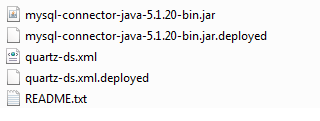
#============================================================================
# Configure Main Scheduler Properties
#============================================================================
 org.quartz.scheduler.instanceName = MyScheduler
 org.quartz.scheduler.instanceId = AUTO
 #============================================================================
 # Configure ThreadPool
 #============================================================================
 org.quartz.threadPool.class = org.quartz.simpl.SimpleThreadPool
 org.quartz.threadPool.threadCount = 25
 org.quartz.threadPool.threadPriority = 5
 #============================================================================
 # Configure JobStore
 #============================================================================
 org.quartz.jobStore.class = org.quartz.impl.jdbcjobstore.JobStoreCMT
 org.quartz.jobStore.driverDelegateClass = org.quartz.impl.jdbcjobstore.StdJDBCDelegate
 org.quartz.jobStore.useProperties = false
 org.quartz.jobStore.dataSource = quartzDS
 org.quartz.jobStore.nonManagedTXDataSource = quartzDSNoTx
 org.quartz.jobStore.tablePrefix = QRTZ_
 org.quartz.jobStore.clusterCheckinInterval = 20000
 org.quartz.jobStore.isClustered = false
 org.quartz.jobStore.acquireTriggersWithinLock=true
 #============================================================================
 # Configure Datasources
 #============================================================================
 org.quartz.dataSource.quartzDS.jndiURL= java:jboss/datasources/quartzDS
 org.quartz.dataSource.quartzDSNoTx.jndiURL= java:jboss/datasources/quartzDS
JAVA_OPTS="-Xms64m -Xmx512m -XX:MaxPermSize=256m -Dorg.quartz.properties=/home/quartz/quartz.properties " ...


