ICEfaces provides a rich web presentation environment for JavaServer Faces (JSF) applications that enhances the standard JSF framework and lifecycle with Ajax-based interactive features. In this tutorial we will learn how to deploy a simple IceFace application on JBoss 5.
The primary goal behind the ICEfaces architecture is to provide the application developers with a familiar Java enterprise development model, and completely shelter them from the complexities of low-level Ajax development in JavaScript.
The Framework is an extension to the standard JSF framework, with the key difference in ICEfaces relating to the rendering phase. In standard JSF, the render phase produces new markup for the current application state, and delivers that to the browser, where a full page refresh occurs.
With the ICEfaces framework, rendering occurs into a server-side DOM and only incremental changes to the DOM are delivered to the browser and reassembled with a lightweight Ajax Bridge. This results in seamless, smooth update of the browser page with only the necessary presentation elements being rerendered.

Running an example
We will introduce to the IceFaces component with an example taken from the IceFaces’s site. At first download the latest distribution from IceFaces:
http://www.icefaces.org/main/downloads/os-downloads.iface
What you need to know when you deploy an IceFaces application to JBoss is that some libraries included in the distribution are already in JBoss Server Classpath so you must not include them !
These libraries are the commons-collections.jar, JBoss JSF libs ( jsf-api.jar , jsf-impl-1.x.jar) and jstl.jar.
Create a new Web Project and add all IceFaces libraries (except the one just mentioned). This is a snapshot from Eclipse.
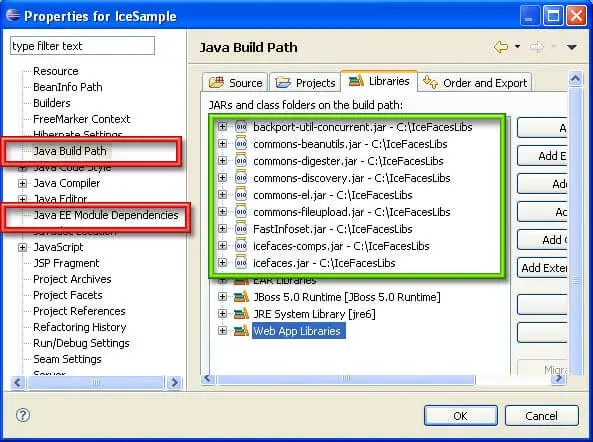
Add the libraries both in the Build Path and in the Java EE Module dependancies. This sample project will demonstrate how to run a dataTable component in a IceFaces environment. Add a file named table.jsfx to your webroot:
<?xml version="1.0"?>
<f:view xmlns:h="http://java.sun.com/jsf/html" xmlns:f="http://java.sun.com/jsf/core" xmlns:ice="http://www.icesoft.com/icefaces/component">
  <ice:outputDeclaration doctypeRoot="HTML" doctypePublic="-//W3C//DTD HTML 4.01 Transitional//EN" doctypeSystem="http://www.w3.org/TR/html4/loose.dtd"/>
  <html>
    <head>
      <meta http-equiv="Content-Type" content="text/html; charset=iso-8859-1"/>
      <title>DataTable Component Tutorial</title>
      <link href="./xmlhttp/css/xp/xp.css" rel="stylesheet" type="text/css"/>
    </head>
    <body>
      <h2>Basic dataTable Component</h2>
      <p>This is a very basic table comprising four columns. Each
row represents an inventory item. Each column represents a
inventory item property. </p>
      <ice:form>
        <ice:dataTable value="#{inventoryList.carInventory}" var="item">
          <!-- Stock number -->
          <ice:column>
            <f:facet name="header">
              <ice:outputText value="Stock #"/>
            </f:facet>
            <ice:outputText value="#{item.stock}"/>
          </ice:column>
          <!-- Model number -->
          <ice:column>
            <f:facet name="header">
              <ice:outputText value="Model"/>
            </f:facet>
            <ice:outputText value="#{item.model}"/>
          </ice:column>
          <!-- Description  -->
          <ice:column>
            <f:facet name="header">
              <ice:outputText value="Description"/>
            </f:facet>
            <ice:outputText value="#{item.description}"/>
          </ice:column>
          <!-- Odometer reading -->
          <ice:column>
            <f:facet name="header">
              <ice:outputText value="Odometer"/>
            </f:facet>
            <ice:outputText value="#{item.odometer}"/>
          </ice:column>
          <!-- Price number -->
          <ice:column>
            <f:facet name="header">
              <ice:outputText value="Price"/>
            </f:facet>
            <ice:outputText value="#{item.price}"/>
          </ice:column>
        </ice:dataTable>
      </ice:form>
    </body>
  </html>
</f:view>
The jsf page is backed by the following JSF Bean:
package com.sample;

public class TableBean {

    //  List of sample inventory data.
    private Item[] carInventory = new Item[]{
        new Item(100, "Dodge Grand Caravan", " Sto&Go/Keyless",  43500, 21695),
        new Item(101, "Dodge SX 2.0", "Loaded/Keyless", 28000 ,14495),
        new Item(102, "Chrysler Sebring Touring", "Keyless/Trac Cont", 31500, 15995),
        new Item(103, "Chrysler PT Cruiser Convertible", "Touring/Loaded", 7000 , 22195),
        new Item(104, "Chrysler Pacifica AWD", "Heated Lthr/19' Alloy", 43500, 31995),
        new Item(105, "Jeep Liberty Sport", "Loaded/Keyless", 31000, 26995),
        new Item(106, "Dodge SX 2.0", "Loaded/Keyless", 19500, 15495),
        new Item(107, "Chrysler Pacifica AWD", "Moonroof/DVD", 15500, 35695),
        new Item(108, "Pontiac Montana SV6 Ext", "Loaded/Quads", 40000, 22695),
        new Item(109, "Jeep Grand Cherokee", "Laredo/Trailer", 26500, 27495),
        new Item(110, "Jeep Grand Cherokee", "Laredo/Trailer", 27000, 28595),
    };

    /**
    * Gets the inventoryItem array of car data.
    * @return array of car inventory data.
    */
    public Item[] getCarInventory() {
        return carInventory;
    }

    /**
    * Inventory Item subclass stores data about a cars inventory data.  Properties
    * such a stock, model, description, odometer and price are stored.
    */
    public class Item {
        // slock number
        int stock;
        // model or type of inventory
        String model;
        // description of item
        String description;
        // number of miles on odometer
        int odometer;
        // price of car in Canadian dollars
        int price;

        /**
        * Creates a new instance of InventoryItem.
        * @param stock stock number.
        * @param model model or type of inventory.
        * @param description description of item.
        * @param odometer number of miles on odometer.
        * @param price price of care in Canadian dollars.
        */
        public Item(int stock, String model, String description, int odometer, int price) {
            this.stock = stock;
            this.model = model;
            this.description = description;
            this.odometer = odometer;
            this.price = price;
        }

        /**
        * Gets the stock number of this iventory item.
        * @return stock number.
        */
        public int getStock() {
            return stock;
        }

        /**
        * Gets the model number of this iventory item.
        * @return model number.
        */
        public String getModel() {
            return model;
        }

        /**
        * Gets the description of the this iventory item.
        * @return description
        */
        public String getDescription() {
            return description;
        }

        /**
        * Gets the odometer reading from this iventory item.
        * @return  odometer reading.
        */
        public int getOdometer() {
            return odometer;
        }

        /**
        * Gets the price of this item in Canadian Dollars.
        * @return price.
        */
        public int getPrice() {
            return price;
        }

    }

}
The faces-config follows here:
<?xml version="1.0"?>
<!DOCTYPE faces-config PUBLIC "-//Sun Microsystems, Inc.//DTD JavaServer Faces Config 1.1//EN" "http://java.sun.com/dtd/web-facesconfig_1_1.dtd">
<faces-config>
  <application>
    <locale-config>
      <default-locale>en</default-locale>
    </locale-config>
  </application>
  <!-- Basic Tree example bean-->
  <managed-bean>
    <description>
Backing bean for tree example.
</description>
    <managed-bean-name>inventoryList</managed-bean-name>
    <managed-bean-class>
com.sample.TableBean
</managed-bean-class>
    <managed-bean-scope>session</managed-bean-scope>
  </managed-bean>
</faces-config>
The last configuration step is the web.xml which contains IceFaces’s own Servlet Processor which will be loaded at start-up:
<?xml version="1.0"?>
<!DOCTYPE web-app PUBLIC "-//Sun Microsystems, Inc.//DTD Web Application 2.3//EN" "http://java.sun.com/dtd/web-app_2_3.dtd">
<web-app>
  <context-param>
    <param-name>com.icesoft.faces.debugDOMUpdate</param-name>
    <param-value>false</param-value>
  </context-param>
  <context-param>
    <param-name>javax.faces.STATE_SAVING_METHOD</param-name>
    <param-value>server</param-value>
    <description>
State saving method: "client" or "server" (= default)
See JSF Specification 2.5.2
</description>
  </context-param>
  <context-param>
    <param-name>com.icesoft.faces.concurrentDOMViews</param-name>
    <param-value>true</param-value>
  </context-param>
  <context-param>
    <param-name>com.icesoft.faces.synchronousUpdate</param-name>
    <param-value>true</param-value>
  </context-param>
  <listener>
    <listener-class>com.icesoft.faces.util.event.servlet.ContextEventRepeater</listener-class>
  </listener>
  <!-- Faces Servlet -->
  <servlet>
    <servlet-name>Faces Servlet</servlet-name>
    <servlet-class>javax.faces.webapp.FacesServlet</servlet-class>
    <load-on-startup>1</load-on-startup>
  </servlet>
  <servlet>
    <servlet-name>Persistent Faces Servlet</servlet-name>
    <servlet-class>com.icesoft.faces.webapp.xmlhttp.PersistentFacesServlet</servlet-class>
    <load-on-startup> 1 </load-on-startup>
  </servlet>
  <servlet>
    <servlet-name>Blocking Servlet</servlet-name>
    <servlet-class>com.icesoft.faces.webapp.xmlhttp.BlockingServlet</servlet-class>
    <load-on-startup> 1 </load-on-startup>
  </servlet>
  <!-- extension mapping -->
  <servlet-mapping>
    <servlet-name>Faces Servlet</servlet-name>
    <url-pattern>*.jsf</url-pattern>
  </servlet-mapping>
  <servlet-mapping>
    <servlet-name>Persistent Faces Servlet</servlet-name>
    <url-pattern>*.jsf</url-pattern>
  </servlet-mapping>
  <servlet-mapping>
    <servlet-name>Persistent Faces Servlet</servlet-name>
    <url-pattern>*.iface</url-pattern>
  </servlet-mapping>
  <servlet-mapping>
    <servlet-name>Persistent Faces Servlet</servlet-name>
    <url-pattern>/xmlhttp/*</url-pattern>
  </servlet-mapping>
  <servlet-mapping>
    <servlet-name>Blocking Servlet</servlet-name>
    <url-pattern>/block/*</url-pattern>
  </servlet-mapping>
  <session-config>
    <session-timeout>1</session-timeout>
  </session-config>
  <!-- Welcome files -->
  <welcome-file-list>
    <welcome-file>index.jsf</welcome-file>
    <welcome-file>index.jsp</welcome-file>
    <welcome-file>index.html</welcome-file>
  </welcome-file-list>
</web-app>
Deploy the web application and test it using the IceFaces invocation pattern:
http://localhost:8080/icesample/table.iface
(Replace icesample with your Web Context Root)
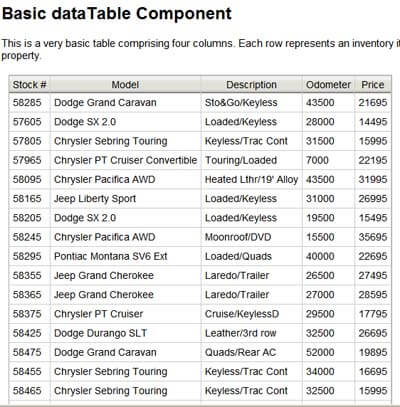
The output should produce an IceFaces datatable with some sample data inserted in it.
Download the sources from IceFaces site (requires registration)
Found the article helpful? if so please follow us on Socials


