This article will teach you how to write a simple REST Service that you can run on top of WildFly application server, which uses RESTEasy as underlying JAX-RS implementation.
Overview of RESTEasy
A REST API, also known as a RESTful API, is an application programming interface that conforms to the constraints of the REST architectural style. When a client sends a request using a RESTful API, it transfers a representative state of the resource to the requester or endpoint. The information can use several formats, such as: JSON, HTML, XML, or plain text.
Here are they key principles of RESTFul Web services:
- Addressable resources: means that you map each resource with a unique URI
- Use of standard HTTP methods (GET, POST; PUT, DELETE) to interact with the resource.
- Representation-oriented: you interact with services using representations of that service. A resource referenced by one URI can have different formats, as different platforms need different formats. (e.g. browsers need HTML, JavaScript needs JSON and so on).
- Communication between the client and the endpoint is stateless. All the associated state required by the server is passed by the client in each invocation.
In this tutorial we will show some examples of REST Services using RESTEasy.
What is RESTEasy? RESTEasy is an implementation of Jakarta RESTful Web Services API. It is essentially a frameworks to help you build RESTful Web Services and it is bundled in WildFly / JBoss EAP application server.
Create your first RESTful service
We will show how to create your first REST Service and then we will deploy it on a Jakarta EE server such as WildFly application server. Firstly, create a Web application project using any tool. For example, using Maven:
mvn archetype:generate \
    -DarchetypeGroupId=org.wildfly.archetype \
    -DarchetypeArtifactId=wildfly-getting-started-archetype
Next, include the required dependencies in your pom.xml file:
<dependencies>
    <dependency>
        <groupId>jakarta.platform</groupId>
        <artifactId>jakarta.jakartaee-api</artifactId>
        <version>10.0.0</version>
        <scope>provided</scope>
    </dependency>
</dependencies>
The jakartaee-api is an umbrella dependency for all Jakarta EE API (including JAX-RS). We also need to incude jakarta.xml.bind-api if we want to marshall/unmarshall XML elements.
In the first example, we will invoke a RESTful Service which returns a String through the following GET Endpoint:
package com.sample;

import jakarta.ws.rs.*;

@Path("tutorial")
public class HelloWorld
{

    @GET
    @Path("helloworld")
    public String helloworld() {
        return "Hello World!";
    }
}
The @Path annotation at class level is specifies the base URL of the REST service. Then you can assign a @Path annotation at method level to specify the single action you want to invoke.
Before deploying your application, you need a JAX-RS class activator, which is a class extending javax.ws.rs.core.Application and declaring the Path where JAX-RS Services will be available:
package com.sample.activator;

import jakarta.ws.rs.ApplicationPath;
import jakarta.ws.rs.core.Application;

@ApplicationPath("/rest")
public class JaxRsActivator extends Application {

}
In this example, if you need to invoke the helloworld service, you have to use the following URL: http://localhost:8080/rest/rest-demo/tutorial/helloworld (we suppose that the web application name is rest-demo.war)
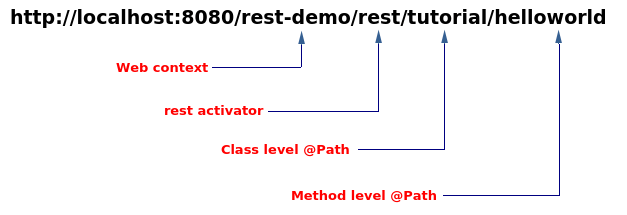
This would produce the classic “Hello World” message on your browser. Now let’s add a parameter to our service:
@GET
@Path("helloname/{name}")
public String hello(@PathParam("name") final String name) {
  return "Hello " +name;
}
Here, we have defined the “helloname” service which accepts the {name} parameter. Now the service returns the value which you are appending to the URL. For example:
http://localhost:8080/rest/rest-demo/tutorial/helloname/francesco
returns:
Hello Francesco
Returning XML from your JAX-RS services
As required by the specification, JAX-RS includes support for (un)marshalling JAXB annotated classes.
As a matter of fact, the JAX-RS server will select a different provider based on the return type or parameter type used in the resource. RESTEasy chooese a JAXB Provider when you annotate a parameter or return type with JAXB annotations (such as @XmlRootEntity or @XmlType).
For example, supposing you were to return an XML containing the Item class:
package com.sample;

import jakarta.xml.bind.annotation.XmlRootElement;

@XmlRootElement
public class Item {
	public Item() { 	}

	public Item(String description, int price) {
            this.description = description;
            this.price = price;
	}

	private String description;
	private int price;

        // Getter- Setter methods

}
Now add this method to your HelloWorld service:
@GET
@Path("item")
@Produces({"application/xml"})
public Item  getItem() {
  Item item = new Item("computer",2500);
 return item;
}
When invoked, the service (http://localhost:8080/rest-demo/rest/tutorial/item) will return the following XML:
<item>
   <description>computer</description>
   <price>2500</price>
</item>
If you need to return an array of Item, you can simply use:
@GET
@Path("itemArray")
@Produces({"application/xml"})
public Item[]  getItem() {
  Item item[] = new Item[2];
  item[0] = new Item("computer",2500);
  item[1] = new Item("chair",100);

  return item;
}
using curl to test the above method:
curl -s http://localhost:8080/rest-demo/rest/tutorial/itemArray | xmllint --format -
The following XML will the resoponse:
<?xml version="1.0" encoding="UTF-8" standalone="yes"?>
<collection>
  <item>
    <description>computer</description>
    <price>2500</price>
  </item>
  <item>
    <description>chair</description>
    <price>100</price>
  </item>
</collection>
If, on the othen hand, you need to use standard Java collections, you can use a java.util.List to return a set of Item objects:
@GET
@Path("itemList")
@Produces(MediaType.APPLICATION_XML)
public List<Item> getCollItems() {
	List list = new ArrayList();
	Item item1 = new Item("computer",2500);
	Item item2 = new Item("chair",100);
	Item item3 = new Item("table",200);

	list.add(item1);
	list.add(item2);
	list.add(item3);

	return list;
}
using curl to return the List of Item objects:
curl -s http://localhost:8080/rest-demo/rest/tutorial/itemList | xmllint --format -
The following XML will be the response:
<?xml version="1.0" encoding="UTF-8" standalone="yes"?>
<collection>
  <item>
    <description>computer</description>
    <price>2500</price>
  </item>
  <item>
    <description>chair</description>
    <price>100</price>
  </item>
  <item>
    <description>table</description>
    <price>200</price>
  </item>
</collection>
Returning JSON from your JAX-RS services
The JSON provider is widely used as it can return Collections such as lists, sets, or arrays For example:
For example, the following getJSONItems returns data using JSON provider:
@GET
@Path("itemListJson")
@Produces("application/json")
public List<Item>  getJSONItems() {
        ArrayList list = new ArrayList();
        Item item1 = new Item("computer",2500);
        Item item2 = new Item("chair",100);
        Item item3 = new Item("table",200);

        list.add(item1);
        list.add(item2);
        list.add(item3);

        return list;
}
You can use curl to request the above method:
curl -s http://localhost:8080/rest-demo/rest/tutorial/itemListJson | jq
Here is the expected outcome:
[
  {
    "description": "computer",
    "price": 2500
  },
  {
    "description": "chair",
    "price": 100
  },
  {
    "description": "table",
    "price": 200
  }
]
Source code for this tutorial: https://github.com/fmarchioni/mastertheboss/tree/master/jax-rs/basic
Continue Learning REST Services
In this tutorial we have covered the basics of REST Services using just the HTTP GET verb. If you want to see a complete example of REST Service CRUD application (backed by JPA), then check this tutorial:
REST CRUD application with JPA | A complete example
On the other hand, if you want to learn how to manage HTTP Parameters, we recommend this article:
RESTEasy web parameters handling
JAX-RS using older JBoss AS versions
Older versions of the application server might require additional steps . Let’s see them in detail.
JBoss 6/7
If you are going to run RESTEasy with JBoss 6/7 you don’t have to download/install anything. The RESTEasy libraries are already bundled in the application server. Also the application server detects automatically the resources which are exported as Restful services.
All you have to do is inserting the correct web.xml namespaces:
<web-app xmlns="http://java.sun.com/xml/ns/javaee"
     xmlns:xsi="http://www.w3.org/2001/XMLSchema-instance"
     xsi:schemaLocation="http://java.sun.com/xml/ns/javaee
      http://java.sun.com/xml/ns/javaee/web-app_3_0.xsd"
     version="3.0">
Older JBoss releases
If you have got any other JBoss AS release you have to perform a few basic steps for installing RESTEasy:
Step 1# Download Resteasy from the Repository
The first step is to download the latest Resteasy stable release from:
http://sourceforge.net/projects/resteasy/files/Resteasy%20JAX-RS/
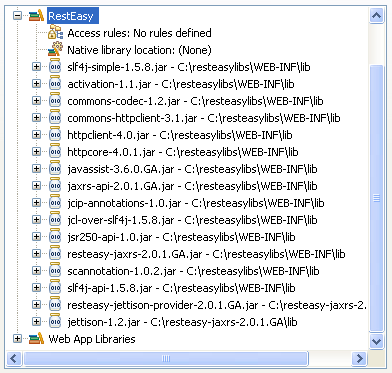
Step 2# Add the following libraries to your Web application:
Step 3# Define listeners and bootstrap classes:
Add the following web.xml configuration:
<web-app>
    <display-name>RestEasy sample Web Application</display-name>

    <listener>
        <listener-class>
            org.jboss.resteasy.plugins.server.servlet.ResteasyBootstrap
        </listener-class>
    </listener>

    <servlet>
        <servlet-name>Resteasy</servlet-name>
        <servlet-class>
            org.jboss.resteasy.plugins.server.servlet.HttpServletDispatcher
        </servlet-class>
        <init-param>
            <param-name>javax.ws.rs.Application</param-name>
            <param-value>sample.HelloWorldApplication</param-value>
        </init-param>

    </servlet>

    <servlet-mapping>
        <servlet-name>Resteasy</servlet-name>
        <url-pattern>/*</url-pattern>
    </servlet-mapping>

</web-app>
The org.jboss.resteasy.plugins.server.servlet.ResteasyBootstrap class is a ServletContextListener that configures an instance of an ResteasyProviderFactory and Registry.
Then, you need to set the parameter javax.ws.rs.core.Application with the singleton class which is used by your application to enlist all JAX-RS root resources and providers. Using JBoss 6-M4 and Higher this is not necessary as it’s performed automatically by the application server when you deploy the .war
Finally you need to specify which url patterns need to be filtered by Resteasy. With the /* url-pattern all resources will be passed to resteasy servlet.
Step 4# Create the Singleton class
Now we need to add a special Singleton class to enlist all JAX-RS resources, as indicated by the javax.ws.rs.Application parameter.
package sample;

import java.util.HashSet;
import java.util.Set;
import javax.ws.rs.core.Application;

import sample.HelloWorld;

public class HelloWorldApplication extends Application
{
    private Set<Object> singletons = new HashSet();
    private Set<Class<?>> empty = new HashSet();

    public HelloWorldApplication() {
        // ADD YOUR RESTFUL RESOURCES HERE
        this.singletons.add(new HelloWorld());
    }

    public Set<Class<?>> getClasses()
    {
        return this.empty;
    }

    public Set<Object> getSingletons()
    {
        return this.singletons;
    }
}
This is your Application class which will enlist your RESTful services in the constructor. In our example, we will add the HelloWorld service.
Autoscanning of resources
If you prefer, you can let RESTeasy scan for your resources instead of adding the SingletonBean which installs your JAX-WS resources. Just add the following configuration in your web.xml:
   <context-param>
      <param-name>resteasy.scan</param-name>
      <param-value>true</param-value>
   </context-param>
   <context-param>
      <param-name>resteasy.servlet.mapping.prefix</param-name>
      <param-value>/</param-value>
   </context-param>


