In this updated tutorial we will cover some of the best practices when designing or coding process with jBPM.
Include multiple end events
A process, by design, requires at least a Start Task and an End Task. In most cases, however, it is not advised to include a single end state where all process branches end up.
With a single End event, it is not so simple to understand which conditions and nodes have been navigated during execution.
On the opposite, by defining individual end states – like in the following example- it’s easier to debug the execution of the process.

Keep your DB data from growing too much
To keep your process environment healthy, you should consider to include a periodic job which cleans up audit data.
The LogCleanupCommand is jbpm executor command that consists of logic to clean up all (or a part of) audit data automatically. This executor leverages the audit API to clean it up but provides one significant benefit: it can be scheduled and executed repeatedly by using the reoccurring jobs feature of jbpm executor.
To use LogCleanupCommand it is necessary to schedule a job and to specify needed options.
You can schedule the in multipe ways (f.e using The Business Central, programmatically or using the REST API).
- If you want to use the REST API, the following is the endpoint that should be run to execute
LogCleanupCommand:
http://localhost:8080/kie-server/services/rest/server/jobs
Here is a list of parameters that can be used to customize the execution of the LogCleanupCommand:
| Name | Description | Is exclusive |
|---|---|---|
| SkipProcessLog | Indicates if clean up of process instance, node instance and variables log cleanup should be omitted (default false) | No, can be used with other parameters |
| SkipTaskLog | Indicates if task audit and task event logs cleanup should be omitted (default false) | No, can be used with other parameters |
| SkipExecutorLog | Indicates if jbpm executor entries cleanup should be omitted (default false) | No, can be used with other parameters |
| SingleRun | Indicates if the job should run only once default false | No, can be used with other parameters |
| NextRun | Date for next run in time expression e.g. 12h for jobs to be executed every 12 hours, if not given next job will run in 24 hours from time current job completes | No, can be used with other parameters |
| OlderThan | Date that logs older than should be removed – date format YYYY-MM-DD, usually used for single run jobs | Yes, cannot be used when OlderThanPeriod is used |
| OlderThanPeriod | Timer expression that logs older than should be removed – e.g. 30d to remove logs older than 30 day from current time | Yes, cannot be used when OlderThan is used |
| ForProcess | Process definition id that logs should be removed for | No, can be used with other parameters |
| ForDeployment | Deployment id that logs should be removed for | No, can be used with other parameters |
| EmfName | Persistence unit name that shall be used to perform delete operations | N/A |
Additionally, you can provide a parameter called callbacks which is the name of a custom java class. This custom java class can be used to send a notification when the LogCleanupCommand has completed. For example, it can be used to send an email and it will be executed once the main command is finished.
What is the simplest way to see all REST points available
JBPM ships with the Swagger framework to generate a better REST API documentation. After deploying kie-server.war, the documentation will be available at http://localhost:8080/kie-server/docs
By using the Swagger interface, you can operate on all jBPM core objects from its friendly REST UI:

Check this tutorial to learn more about jBPM REST API: jBPM REST API tutorial
How to set an initial value for a variable?
The BPMN 2.0 specification that does not provide default values for variables.
To work around this limitation, you can use some scripting: for example add a Script task with on-entry scripts, where you can set the variables in code before starting process. Example:
kcontext.setVariable("toBeApproved",true);
How to execute Java code in your Processes?
There are several options which can be used to execute Java code from within your Process. There is no single best practice however every option can be used more efficiently in some use cases.
The simplest way to execute Java code in jBPM is via Script Task. A Script Task contains a script that should be executed in this process.
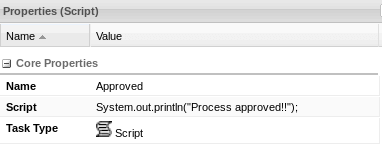
A Script Task allows you to do anything inside such a script node, without any configuration required. You should bear in mind the following caveats though:
- Avoid including low-level implementation details inside the Script tasks. That’s not a best practice. A Script Task works well to quickly manipulate variables etc. but other concepts like a Service Task could be used to model more complex behaviour.
- Do not include long running executions in Script Tasks. They are using the KieServer threads to execute the script. Scripts that could take some time to execute should probably be modeled as an asynchronous Service Task.
- Scripts should not throw exceptions. Runtime exceptions should be caught and for example managed inside the script or transformed into signals or errors that can then be handled inside the process.
- Script Tasks can be used to add debug statements in your process however they cannot be debugged in an IDE. Also, they have limited syntax highlight and autocomplete features.
- Finally, if the code within the Script Tasks needs to be maintained over time, consider moving it to a Service Task or Custom Tasks as they can be versioned in a repository.
The other option to run Java code in jBPM is to use a Service Task. A Service Task is a task that does not require any human action with the engine. It can be executed by the engine synchronously or asynchronously. You can use Service Tasks to invoke external services via REST, send e-mails, log messages, and even invoke complex business rules in order to define the next steps to be taken in the process flow.
As an example, see the following tutorial to learn more about REST Service Task: How to use a REST WorkItem Handler in jBPM
- A Service Task can be coded, tested and debugged inside your IDE making it a superior option compared to a Script Task.
- A Service Task allows you to reuse many available actions such as sending a mail, calling a Web Service or running a SQL Statement with little or no code at all.
- A Service Task works better if you have a standard service integration. If you need a more custom/complex integration, it might not be the ideal choice. For example, if you need extra parameters or additional configuration elements.
Finally, you can run Java code from a Custom Task. The custom task is an empty, generic, unit of work. You need to provide a WorkItemHandler implementation for the task and register
it with WorkItemManager.
- A Custom Task generally works better to validate or enhance customer data. In most cases, you will use it to run complex custom operations as you would typically do in a Stateless Session Bean.
- A Custom Task, on the other hand, demands more coding skills.
- A Custom Task, being a custom unit of work, requires additional files to be shared and examined when you hit an error. You cannot simply share the BPM Process definition.
Handling Exceptions in process definitions
At high level there can be two types of Exceptions that can happen in a Business Process: Technical Exceptions and Business Exceptions.
Technical exceptions happen when a technical component of a business process acts in an unexpected way. Technical components used in a process can fail in a way that can not be described using BPMN2. In this case, it’s important to handle these exceptions in expected ways.
The following types of code might throw exceptions:
- Any code that is present in the process definition itself
- Any code that is executed during a process and is not part of jBPM
- Any code that interacts with a technical component outside of the process engine
It is much easier to ensure correct exception handling for Nodes that use WorkItemHandler implementations, than for code executed directly in a Script Task.
A common best practice to handle Technical Exceptions is by means of Error Events. Error events allow us to perform certain actions if we encounter an exception during our business process. These events are built into the process so that we can visually see how errors are handled.
Here’s an example:

In the above example, we have created a Sub Process to handle the Exception.
A SignalingTaskHandlerDecorator can be wrapped around any work item handler and automatically signals an error event when we throw an Exception.
The other type of Exception that can happen in a Business Process are Business Exceptions.
Business Exceptions are exceptions that are designed and managed in the BPMN2 specification of a business process. In other words, Business Exceptions are exceptions which happen at the process or workflow level, and are not related to the technical components.
Many of the elements in BPMN2 related to Business Exceptions are related to Compensation and Business Transactions.
BPMN2 contains a number of constructs to model exceptions in business processes. There are several advantages to doing exception handling at the Business Process level (as opposed to handling it with code):
- Transparency: The advantage of using exception handling at a Business process level is that the exception scenarios are visible in the process, thus making the monitoring and analysis of these scenarios easier, thereby contributing to continuous improvements of the process.
- Business Logic Isolation: Again, the idea behind using a business process is to isolate the business logic from the technical code. This simplifies the complexity of the system and increases how quickly you can create new business processes and change existing ones.
How to execute a SQL Statement from one of process tasks?
Besides what has been already discussed in “How to execute Java code in your Processes”, you can also use a native option called the ExecuteSQL service task. See this tutorial to learn more about it: Using the ExecuteSQL Service task in jBPM Processes
How to debug the Process name during a Process execution
You can use a Script task and obtain the process name using the kcontext object available. The kcontext is an instance of a ProcessContext .Raw
System.out.println("Process Name: " + kcontext.getProcessInstance().getProcessName());
When used inside a Script Task the above code should allow printing on the server logs the current process name.
Manage Knowledge base correctly
The following code snippet shows how to create a knowledge base consisting of only one process definition (using in this case a resource from the classpath).
KieHelper kieHelper = new KieHelper();
KieBase kieBase = kieHelper
.addResource(ResourceFactory.newClassPathResource("MyProcess.bpmn"))
.build();
The ResourceFactory has similar methods to load files from file system, from URL, InputStream, Reader, etc.
This is considered manual creation of knowledge base and while it is simple it is not recommended for real application development but more for try outs.
Following you’ll find recommended and much more powerful way of building knowledge base, knowledge session and more – RuntimeDataServoce.
@SpringBootApplication
@RestController
public class Application {
  @Autowired
  private ProcessService processService;
  @Autowired
  private RuntimeDataService runtimeDataService;
  @Autowired
  private UserTaskService userTaskService;
  public static void main(String[] args) {
    SpringApplication.run(Application.class, args);
  }
  @GetMapping("/hello")
  public ResponseEntity sayHello(@RequestParam Integer age) throws Exception {
    // Provided as an example. Not actually needed by our process.
    Map vars = new HashMap < > ();
    vars.put("processVar1", "Hello");
    Long processInstanceId = processService.startProcess("business-application-kjar-1_0-SNAPSHOT", "com.mastertheboss.LicenseDemo", vars);
    Map params = new HashMap();
    params.put("age", age);
    List taskSummaries = runtimeDataService.getTasksAssignedAsPotentialOwner("john", new QueryFilter());
    taskSummaries.forEach(s -> {
      Status status = taskSummaries.get(0).getStatus();
      if (status == Status.Ready)
        userTaskService.claim(s.getId(), "john");
      userTaskService.start(s.getId(), "john");
      userTaskService.complete(s.getId(), "john", params);
    });
    return ResponseEntity.status(HttpStatus.CREATED).body("Task completed!");
  }
}
KieBase is a repository that contains all knowledge definitions of the application—rules, processes, forms, and data models—but does not contain any runtime data. Knowledge sessions are created based on a particular KieBase. While creating knowledge bases can be onerous, creating Knowledge Sessions is very light. Therefore, it is recommended to cache Knowledge Bases as much as possible to allow repeated session creation. The caching mechanism is automatically provided by KieContainer.
Keep in mind: creating Kie Bases is an expensive operation. Creating new Kie Sessions is cheap.
How to retrieve information about currently active process instances?
The ProcessRuntime interface defines all the session methods for interacting with processes,
In particular its method getProcessInstances() returns a collection of currently active process instances. Note that only process instances that are currently loaded and active inside the engine will be returned.
When using persistence, it is likely not all running process instances will be loaded as their state will be stored persistently.
For this reason, the use of a history log is a common best practice. For example:
[GET] /runtime/{deploymentId}/history/instances
- Gets a list of
ProcessInstanceLoginstances - Returns a
HistoryLogListinstance that contains a list ofProcessInstanceLoginstances - This operation responds to pagination parameters
Choosing wisely a strategy
There are three Process Runtime Strategies available. You should understand the key concepts of each strategy to make the best decision.
Singleton Runtime Strategy: This runtime strategy is the default one added in your Processes. This strategy uses a single Kie Session making easier to manage your processes since every inserted object is available in the same Kie Session. As the Kie Session is persisted, it can be reused if the Kie server restarts.
Rule execution within processes can be impacted. Consider that: if process instance A inserts person John to be evaluated by business rules. Process instance B, inserts Maria. Later, when process C fires rules for its own person, John and Maria will still be in memory and will be evaluated by process C rules improperly!
The Singleton Runtime Strategy uses a synchronized Runtime Engine for process execution. This makes thread-safe the execution, however, it can affect your performance. This is especially true if your process has a high workload and uses thread-safe resources such as Timers or Signals.
Per Request Strategy: This runtime strategy is based on a stateless behavior. The runtime engine will create a Kie Session per request and destroy it when the request is completed. The Kie Session will not be persisted. This strategy is ideal to scale high workload processes however it can make your implementation more complex.
As a matter of fact you need to design your processes in a way that only a single request interacts with the same process instance. The worst scenario could be if two requests attempt to interact with the same process instance at the same time. In this scenario it is possible that an OptimisticLockException is thrown when both requests are trying to commit data at the same time.
Per Process Instance Strategy: in this runtime strategy a KieSession is created when a Process Instance is created. The Process instance is finalized when the Process ends.
The runtime manager maintains mapping between process instance and KieSession and always provides same KieSession whenever working with given process instance
This strategy works well in most cases, however it is recommended if your process are based on Business Rule Tasks and Timers.
How to manage async execution
jBPM has a generic environment for the execution of these Commands, where the Job Executor is responsible for triggering async tasks, the timer events, and executing scheduled jobs.
Async Tasks: BPMN Tasks when flagged with “Is Async” they will be invoked asynchronously. The actual task execution will be handled in a different thread. In case of failure, the task will be automatically retried by the Executor. An async task is typically used when we delegate to an external service a task execution.
Timer events: A timer is an event activity, which asynchronously triggers subsequent activities based on a schedule. You can use a Timer event as a Start event, as an intermediate catching event (waiting before starting a new task) or as a boundary catching event for tasks or subprocesses
Jobs: A job in jBPM is code unit that is called asynchronously based on a schedule.
The job executor is the jBPM component responsible for resuming process executions asynchronously. It can be configured to attend custom needs from each environment.
On executor start, all jobs are always loaded from the Database. That makes sure all jobs will be executed, even in cases where their execution time has already passed or was scheduled by other executor instance. The table RequestInfo stores the jobs that need to be executed. In the expected cycle jobs should be queued, run, and completed.
By default, a single thread pool is used, and services will be retried three times in case of failures. It is a good practice to increase the Thread Pool size if you have a high number of jobs to be execute, to avoid ending up with a large set of queued jobs.
A good example of job usage in jBPM is to schedule jobs to maintain good environmental health by constantly cleaning the old database audit data.
Found the article helpful? if so please follow us on Socials


