How to run WildFly as Service
The guide discusses how to configure WildFly or JBoss as a Service on a Linux machine or on a Windows box. We will cover the code settings and addresses common pitfalls and aligns with current best practices.
Linux (systemd Integration)
WildFly 36 includes native systemd support. Follow these steps:
Firstly, generate Systemd Files:
cd $WILDFLY_HOME/bin/systemd
./generate_systemd_unit.sh standalone <user> <group>
Then, replace <user> and <group> with your service account. This creates wildfly-standalone.service.
Finally, anstall and activate the service:
sudo cp wildfly-standalone.service /etc/systemd/system/
sudo systemctl daemon-reload
sudo systemctl enable wildfly-standalone
Key commands:
sudo systemctl start wildfly-standalone    # Start
sudo systemctl stop wildfly-standalone     # Graceful stop
sudo systemctl restart wildfly-standalone  # Restart
Critical configurations (add to [Service] section):
TimeoutStopSec=90       # Prevents premature termination
Restart=on-failure      # Auto-recover from crashes
User=wildfly            # Dedicated service account
Pitfall Fixes:
- Port conflicts: If ports remain occupied after shutdown, increase
TimeoutStopSecto 90+ seconds. - Silent failures: Set
Type=simplein unit files (default for WildFly 36).
Windows Service Management
Use the bundled service.bat. Start by installing the service:
cd %WILDFLY_HOME%\bin
service.bat install
Then, here is how you can manage the service on Windows:
service.bat start     # Start
service.bat stop      # Stop
service.bat restart   # Restart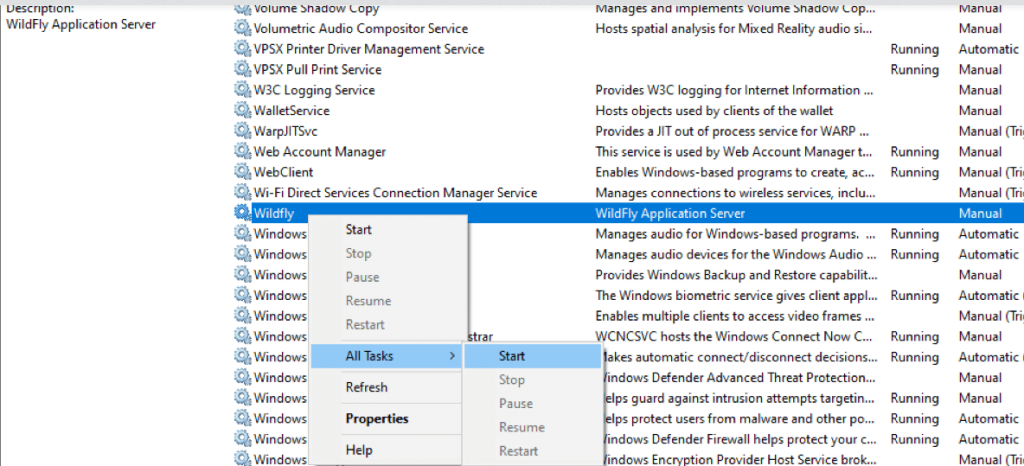
Finally, in Domain mode:
service.bat install /controller=localhost:9990 /host=masterTroubleshooting:
- Permission issues: Run installation as Administrator.
- Startup failures: Verify
JAVA_HOMEis set inservice.bat.
Key Improvements vs. Legacy Methods
| Feature | Legacy (AS7) | WildFly 36 |
|---|---|---|
| Linux Init | Custom init.d scripts | Native systemd generator |
| Windows Dependencies | JBoss Web Native required | Zero dependencies |
| Graceful Shutdown | Manual CLI calls | Built-in TimeoutStopSec |
| Permission Handling | Manual chown/chmod | User/Group directives |
Best Practices
- Service account setup: bash
useradd -r -s /sbin/nologin wildfly chown -R wildfly:wildfly $WILDFLY_HOME - Logging: Redirect output to journald (Linux) or
standalone/log/(Windows). - Auto-recovery: Enable
Restart=on-failurein systemd units.
⚠️ Critical Note: Always test restarts under load—WildFly’s embedded shutdown hooks now handle thread cleanup more reliably than older versions.