Important notice: Richfaces framework reached End of Life in 2016. Therefore, you cannot expect fixes or enhancements unless you fork the project and upgrade yourself the framework.
We recommend reading these guidelines, if you want to modernize your Richfaces application: How to migrate Richfaces Web applications to another Web UI
The RichFaces project is an advanced UI component framework for creating advanced JSF application leveraging rich component features and Ajax capabilities. Let’s see how to get started with the RichFaces release 4.
At first download the final release 4.X.X of Richfaces framework from here.
The distribution when unpacked contains the following folders:
 archetypes archetypes |
Can be used to create a basic Richfaces application generated with Maven |
| artifacts |
Contains Richfaces libraries |
| docs |
Contains the JavaDocs for Richfaces |
| examples |
Contains the Richfaces core demo suite |
Creating your first Richfaces 4 application
In order to create a Richfaces application you have several option: you can either use Maven for picking up the correct libraries or manually configure your web application libs.
Using Maven to pick up Richfaces libs
For Maven-based projects configure you can simply add to your pom.xml Richfaces dependencies:
<dependencyManagement>
    <dependencies>
        <dependency>
            <groupId>org.richfaces</groupId>
            <artifactId>richfaces-bom</artifactId>
            <version>${richfaces.version}</version>
            <scope>import</scope>
            <type>pom</type>
        </dependency>
    </dependencies>
</dependencyManagement>
…
<dependency>
 <groupId>org.richfaces.ui</groupId>
 <artifactId>richfaces-components-ui</artifactId>
</dependency>
<dependency>
 <groupId>org.richfaces.core</groupId>
<artifactId>
Refer to JBoss’s Maven Guide here for further details about JBoss’s Maven repository
Configuring manually your Richfaces libs
If you want to configure manually Richfaces libraries in your project, you have to add to following jars in your WEB-INF/lib:
| Library | Where to find it |
 richfaces-core-impl-4.0.0.Final.jar richfaces-core-impl-4.0.0.Final.jar |
Richfaces core distribution |
| richfaces-core-api-4.0.0.Final.jar |
Richfaces core distribution |
| richfaces-components-ui-4.0.0.Final.jar |
Richfaces core distribution |
| richfaces-components-api-4.0.0.Final.jar |
Richfaces core distribution |
| sac-1.3.jar |
Third-party lib. Get it here |
| cssparser-0.9.5.jar |
Third-party lib. Get it here |
| guava-r08.jar |
Third-party lib. Get it here |
The last step is configuring your web.xml to map your URL pattern with the Faces Servlet and a bare bone faces-config.xml which states you are using JSF 2.0 specification.
Here’s WEB-INF/web.xml
<?xml version="1.0" encoding="ASCII"?>
<web-app xmlns:xsi="http://www.w3.org/2001/XMLSchema-instance" xmlns="http://java.sun.com/xml/ns/javaee"
    xmlns:web="http://java.sun.com/xml/ns/javaee/web-app_2_5.xsd" xsi:schemaLocation="http://java.sun.com/xml/ns/javaee
    http://java.sun.com/xml/ns/javaee/web-app_3_0.xsd" version="3.0">
    <display-name>rich</display-name>
    <servlet>
        <servlet-name>Faces Servlet</servlet-name>
        <servlet-class>javax.faces.webapp.FacesServlet</servlet-class>
        <load-on-startup>1</load-on-startup>
    </servlet>
    <servlet-mapping>
        <servlet-name>Faces Servlet</servlet-name>
        <url-pattern>*.jsf</url-pattern>
    </servlet-mapping>
</web-app>
And your WEB-INF/faces-config.xml
<?xml version="1.0" encoding="UTF-8"?>

<faces-config
    xmlns="http://java.sun.com/xml/ns/javaee"
    xmlns:xsi="http://www.w3.org/2001/XMLSchema-instance"
    xsi:schemaLocation="http://java.sun.com/xml/ns/javaee http://java.sun.com/xml/ns/javaee/web-facesconfig_2_1.xsd"
    version="2.1">

</faces-config>

</faces-config>
Coding your first RichFaces page
Ok. Now we’re ready to test that your set up was correct. Add a simple test.xhtml page to your web root:
<ui:composition xmlns="http://www.w3.org/1999/xhtml"
 xmlns:h="http://java.sun.com/jsf/html"
 xmlns:f="http://java.sun.com/jsf/core"
 xmlns:ui="http://java.sun.com/jsf/facelets"
 xmlns:a4j="http://richfaces.org/a4j"
 xmlns:rich="http://richfaces.org/rich">

 <f:view>
 <h:head></h:head>
 <h:body>
    <rich:panel header="Richfaces running on JBoss AS 7">

      <ul>
        <li>RichFaces is a component library for JSF</li>
        <li>easily integrating AJAX capabilities.</li>
     </ul>
    </rich:panel>
  </h:body>
 </f:view>


</ui:composition>
Notice the ui:composition tag which points out the name space definitions for JSF and Richfaces tags.
We will see if JBoss AS 7 (Beta2) can digest Richfaces stuff. Export your application in a sample.war archive and place it under the deployments folder of the standalone server.
If you deploy a packaged archive it will be automatically deployed by JBoss 7. Expanded directories would require a xxx.war.dodeploy empty file in the deployments folder.
Request your page with http://localhost:8080/sample/test.jsf
This would produce the following not-so-rich HelloWorld page:
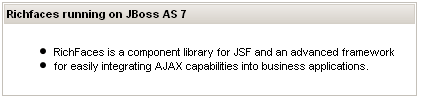
Besides this simple stuff, you can extend your JSF 2 capabilities with lots of new features, including a full set of Ajax enabled components, the new client-side validation expanding the JSR 303 bean validation, Push components and Advanced queueing.
Following here is a sample demo which contains JSR 303 Bean validation on the Name field and auto-field completion on the State field:
<ui:composition xmlns="http://www.w3.org/1999/xhtml"
 xmlns:h="http://java.sun.com/jsf/html"
 xmlns:f="http://java.sun.com/jsf/core"
 xmlns:ui="http://java.sun.com/jsf/facelets"
 xmlns:a4j="http://richfaces.org/a4j"
 xmlns:rich="http://richfaces.org/rich">

 <f:view>
 <h:head></h:head>
 <h:body>


 <rich:panel header="Richfaces sample validation and auto-completion">
   <h:form>
     <h:outputText value="Enter your name" />
     <h:inputText id="name" value="#{userBean.name}">
        <rich:validator />
     </h:inputText>

     <rich:message for="name" />
     <br />


     <h:outputText value="Enter your state" />
     <rich:autocomplete value="#{userBean.state}" minChars="1" autocompleteMethod="#{userBean.autocomplete}" />


   </h:form>
 </rich:panel>


 </h:body>
 </f:view>
</ui:composition>
The ManagedBean UserBean contains the method autocomplete which has the ArrayList of suggestions for the “state” field. It contains also the “name” field which has a validation expression coded on it:
@ManagedBean
public class UserBean {

    public List<String> autocomplete(String prefix) {

        ArrayList<String> result = new ArrayList<String>();
        result.add("England");
        result.add("France");
        result.add("Germany");
        result.add("Italy");
        result.add("Spain");

        return result;
    }

    @Size(min=3, max=12,message="Must be between 3 and 12 chars")
    private String name;

    private String state;

    public String getState() {
        return state;
    }

    public String getName() {
        return name;
    }

}
When requested, the sample page would produce for the field name:
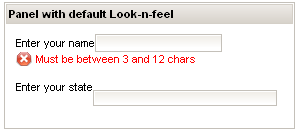
And for the state field:

Validation of Data with RichFaces
Validation is a key part of every web application. Basically, when using a JSF application you can perform validation using two strategies:
- Use JSF built-in Validation model ( Read more here: JSF validation tutorial )
- Use the Hibernate Validator model-based constraints
Hibernate constraints can be validated by RichFaces libraries by means of three tags:
<rich:ajaxValidator>

<rich:graphValidator>

<rich:beanValidator>
<rich:ajaxValidator> can be used to validate a field using Ajax capabilities. This can be used for example if you want to validate your input fields meanwhile the user presses a key or when a field loses its focus. Here’s an example of it:
<h:form id="ajaxValidatorForm">
    <rich:panel>
        <f:facet name="header">
            <h:outputText value="User Info:" />
        </f:facet>
        <h:panelGrid columns="3">

            <h:outputText value="Username:" />
            <h:inputText value="#{bean.userName}" id="name" required="true">
                <rich:ajaxValidator event="onblur" />
            </h:inputText>
            <rich:message for="name" />

            <h:outputText value="Password:" />
            <h:inputText value="#{bean.password}" id="password">
                <rich:ajaxValidator event="onblur" />
            </h:inputText>
            <rich:message for="password" />

            <h:outputText value="Email:" />
            <h:inputText value="#{bean.email}" id="email">
                <rich:ajaxValidator event="onblur" />
            </h:inputText>
            <rich:message for="email" />

        </h:panelGrid>
    </rich:panel>

</h:form>
And this is the SampleBean class:
package sample;

import javax.faces.event.ActionEvent;
import org.hibernate.validator.*;

public class SampleBean {
@NotNull
@Size(min = 5, message = "Please enter the Email" )
@Email
private String email;

@NotNull
@Size(min = 5, max=20, message = "Please enter a valid username (5-20 characters)")
private String userName;

@NotNull
@Size(min = 5, max = 20, message = "Please enter a valid password (5-20 characters)")
private String password;

//. . . .Getter and setter methods

}
If you lots of input fields in a form it can be tedious to add rich:ajaxValidator for all of them. Rather you can wrap ny number of components inside rich:graphValidator and rich:beanValidator will be automatically added to each input component.
<h:form id="ajaxValidatorForm2">
    <rich:graphValidator>
        <rich:panel>
            <f:facet name="header">
                <h:outputText value="User Info:" />
            </f:facet>
            <h:panelGrid columns="3">


                <h:outputText value="Username:" />
                <h:inputText value="#{bean.userName}" id="name"
                    required="true" />
                <rich:message for="name" />

                <h:outputText value="Password:" />
                <h:inputText value="#{bean.password}" id="password" />
                <rich:message for="password" />

                <h:outputText value="Email:" />
                <h:inputText value="#{bean.email}" id="email" />
                <rich:message for="email" />

            </h:panelGrid>
        </rich:panel>
    </rich:graphValidator>
</h:form>
Finally, you can use the
rich:beanValidator
<h:form id="form">

<h:inputText id="age" value="#{bean.age}" label="Age">
<rich:beanValidator
summary="Invalid age, must be between 18 and 90"/>
</h:inputText>
. . . . . . .
<rich:messages/>
</h:form>
Found the article helpful? if so please follow us on Socials


