This is a tutorial about creating a Java application using Hibernate ORM, Eclipse and MySQL Database.
Hibernate is an object/relational mapping tool for Java environments. What does it mean the term object/relational mapping? simply a technique of mapping a data representation from an object model to a relational data model with a SQL-based schema.
Setting up the Eclipse Project
First off, you need to install Eclipse. You can download it from: https://www.eclipse.org/downloads/
After having installed eclipse, create a new Maven project. From the top menu choose: New | Other | Maven project:

Choose the workspace for your project and then pick up the quickstart archetype:

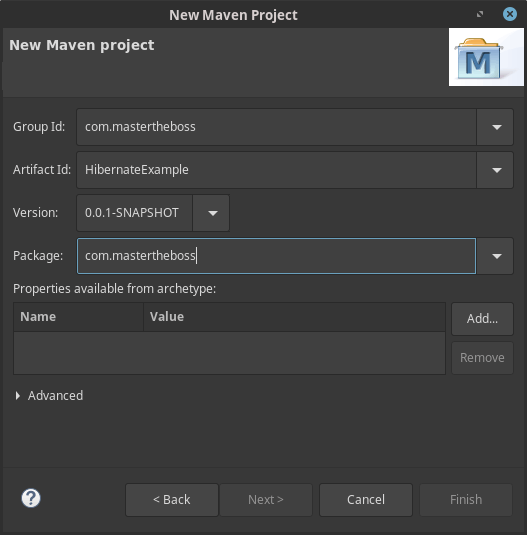
Then, choose the GAV settings for your Maven project:
Coding the Project
Before coding the Java classes, we need to set up the dependencies so that our application will compile. Therefore include the Hibernate and MySQL dependencies in the pom.xml file:
<project xmlns="http://maven.apache.org/POM/4.0.0" xmlns:xsi="http://www.w3.org/2001/XMLSchema-instance"
  xsi:schemaLocation="http://maven.apache.org/POM/4.0.0 http://maven.apache.org/maven-v4_0_0.xsd">
  <modelVersion>4.0.0</modelVersion>
  <groupId>com.mastertheboss</groupId>
  <artifactId>HibernateExample</artifactId>
  <packaging>jar</packaging>
  <version>1.0.0</version>
  <name>HibernateExample</name>
  <url>http://maven.apache.org</url>
    <dependencies>
        <dependency>
            <groupId>org.hibernate</groupId>
            <artifactId>hibernate-core</artifactId>
            <version>5.4.9.Final</version>
        </dependency>
        <dependency>
            <groupId>mysql</groupId>
            <artifactId>mysql-connector-java</artifactId>
            <version>5.1.48</version>
        </dependency>

    </dependencies>
    <build>
        <plugins>
            <plugin>
                <groupId>org.codehaus.mojo</groupId>
                <artifactId>exec-maven-plugin</artifactId>
                <version>1.4.0</version>
                <configuration>
                    <mainClass>com.mastertheboss.App</mainClass>
                    <cleanupDaemonThreads>false</cleanupDaemonThreads>
                </configuration>
            </plugin>
        </plugins>
    </build>
</project>
Now you can fill your project with some basic classes; for this purposes we will use again the Department and Employee classes which are connected with a One to Many relationship.
Here’s the Department.java class:
package com.mastertheboss.domain;

import java.util.ArrayList;
import java.util.List;

import javax.persistence.*;

@Entity
@Table
public class Department {

    @Id
    @GeneratedValue(strategy = GenerationType.IDENTITY)
    private Long id;


    private String name;

    @OneToMany(mappedBy="department",cascade=CascadeType.PERSIST)
    private List<Employee> employees = new ArrayList<Employee>();

    public Department() {
        super();
    }
    public Department(String name) {
        this.name = name;
    }
    public Long getId() {
        return id;
    }
    public void setId(Long id) {
        this.id = id;
    }
    public String getName() {
        return name;
    }
    public void setName(String name) {
        this.name = name;
    }
    public List<Employee> getEmployees() {
        return employees;
    }
    public void setEmployees(List<Employee> employees) {
        this.employees = employees;
    }
}
This is the Employee.java class:
package com.mastertheboss.domain;

import javax.persistence.*;

@Entity
@Table
public class Employee {
    @Id
    @GeneratedValue(strategy = GenerationType.IDENTITY)
    private Long id;

    private String name;

    @ManyToOne
    private Department department;

    public Employee() {}

    public Employee(String name, Department department) {
        this.name = name;
        this.department = department;
    }


    public Employee(String name) {
        this.name = name;
    }

    public Long getId() {
        return id;
    }

    public void setId(Long id) {
        this.id = id;
    }

    public String getName() {
        return name;
    }

    public void setName(String name) {
        this.name = name;
    }

    public Department getDepartment() {
        return department;
    }

    public void setDepartment(Department department) {
        this.department = department;
    }

    @Override
    public String toString() {
        return "Employee [id=" + id + ", name=" + name + ", department="
                + department.getName() + "]";
    }

}
In order to create the Hibernate SessionFactory we will create an Utility class named HibernateUtil.java:
package com.mastertheboss.util;

import org.hibernate.SessionFactory;
import org.hibernate.cfg.Configuration;

public class HibernateUtil {

    private static final SessionFactory sessionFactory = buildSessionFactory();

    private static SessionFactory buildSessionFactory() {
        try {
            // Create the SessionFactory from hibernate.cfg.xml
            return new Configuration().configure().buildSessionFactory();
        } catch (Throwable ex) {
            // Make sure you log the exception, as it might be swallowed
            System.err.println("Initial SessionFactory creation failed." + ex);
            throw new ExceptionInInitializerError(ex);
        }
    }

    public static SessionFactory getSessionFactory() {
        return sessionFactory;
    }

    public static void shutdown() {
        // Close caches and connection pools
        getSessionFactory().close();
    }

}
Fine. We will now add a test class named HibernateTest.java which will test inserting Employees and Departments.
package com.mastertheboss.hibernate;

import java.util.List;


import com.mastertheboss.domain.Employee;
import com.mastertheboss.domain.Department;
import com.mastertheboss.util.*;

import org.hibernate.*;

public class HibernateTest {

public static void main(String[] args) {

        Session session = HibernateUtil.getSessionFactory().openSession();

        session.beginTransaction();

        Department department = new Department("java");
        session.save(department);

        session.save(new Employee("Jakab Gipsz",department));
        session.save(new Employee("Captain Nemo",department));

        session.getTransaction().commit();

        Query q = session.createQuery("From Employee ");

        List<Employee> resultList = q.list();
        System.out.println("num of employess:" + resultList.size());
        for (Employee next : resultList) {
            System.out.println("next employee: " + next);
        }

    }

}
In order to work, this application requires an hibernate.cfg.xml file which needs to be placed into the resources/META-INF folder of your application. For the purpose of our example, we will suppose you have an active MySQL DB on localhost with a mysqldb database:
<?xml version="1.0" encoding="utf-8"?>
<!DOCTYPE hibernate-configuration PUBLIC
"-//Hibernate/Hibernate Configuration DTD 3.0//EN"
"http://hibernate.sourceforge.net/hibernate-configuration-3.0.dtd">
<hibernate-configuration>
 <session-factory>

    <property name="connection.url">jdbc:mysql://localhost:3306/mysqldb</property>
    <property name="connection.username">root</property>
    <property name="connection.password">my-secret-pw</property>
    <property name="connection.driver_class">com.mysql.jdbc.Driver</property>
    <property name="dialect">org.hibernate.dialect.MySQL5Dialect</property>

    <property name="show_sql">true</property>

    <property name="format_sql">true</property>
    <property name="hbm2ddl.auto">create</property>

    <!-- JDBC connection pool (use the built-in) -->
    <property name="connection.pool_size">1</property>
    <property name="current_session_context_class">thread</property>

     <mapping class="com.mastertheboss.domain.Employee" />
     <mapping class="com.mastertheboss.domain.Department" />

</session-factory>
</hibernate-configuration>
Please be aware that by using the property hbm2ddl.auto to create, the tables will be dropped and re-created each time that the application is deployed. Consider using another strategy if you are holding data in your tables like hbm2ddl.auto to validate – Thanks Adam Burley for pointing out this information.
Here’s how your project should look like:
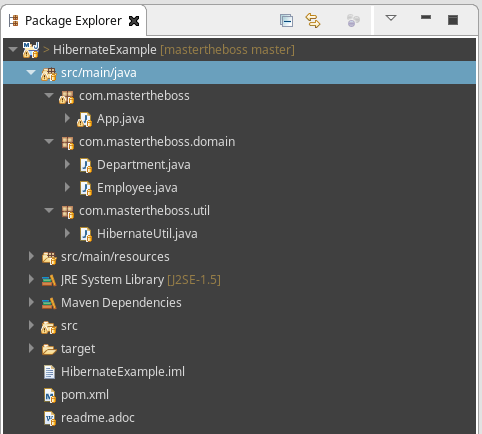
That’s all! You can right-click on your App.java class to test it, or by using the Maven exec:java task:
mvn install exec:java
Hint
You don’t have MySQL installed to test this example? then you can use Docker to run it:
docker run -d -p 3306:3306 -e MYSQL_DATABASE="mysqldb" -e MYSQL_ROOT_PASSWORD=my-secret-pw mysql
Source code available here: https://github.com/fmarchioni/mastertheboss/tree/master/hibernate/HibernateExample
Hibernate Troubleshooting
Here are some common runtime errors and their possible solution:
org.hibernate.HibernateException: No CurrentSessionContext configured
You haven’t configured the current_session_context_class property. Add this to your hibernate.cfg.xml:
<property name="current_session_context_class">thread</property>
org.hibernate.MappingException: Unknown entity: sample.hibernate.Person
It’s likely that you have not added (or added with wrong Classname/namespace) the Class Mapping file.
Could not parse mapping document from resource sample/hibernate/Person.hbm.xml
Exception in thread “main” java.lang.ExceptionInInitializerError
Maybe you have forgot to add the DTD information at the top of your Person.hbm.xml
Initial SessionFactory creation failed.java.lang.NoClassDefFoundError: org/slf4j/impl/StaticLoggerBinder
You are missing the Simply Logging Facade util. Download it http://www.slf4j.org/dist/slf4j-1.5.2.zip and then add either log4j or JDK14 implementation.
Found the article helpful? if so please follow us on Socials


