Infinispan servers provide RESTful HTTP access to data via a REST module built on Netty. In this tutorial we will learn how to use it to manage Cache data with regards to all major Infinispan versions starting from the latest version.
Using Infinispan REST API (latest version)
REST endpoints listen on port 11222 by default.
First off, you can configure authentication to the REST endpoint with the cli.sh script in the bin folder of Infinispan server distribution.
./cli.sh user create
Specify a username: qwer1234!
Set a password for the user: qwer1234!
Confirm the password for the user: qwer1234!
Please note that older Infinispan versions used the “user-tool.sh” script to create users. This is now deprecated in Infinispan 12. Here is an example how to use usertool.sh for older Infinispan versions:
./user-tool.sh
Set a password for the user: qwer1234!
Confirm the password for the user: qwer1234!
Enabling BASIC REST authentication
Before starting, it is required that you enable BASIC authentication for your REST Endpoints. Open the conf/server.xml file and include the authentication mechanisms:
<rest-connector>
      <!-- Specifies SASL mechanisms to use for authentication. -->
      <authentication mechanisms="DIGEST BASIC"/>
   </rest-connector>
</endpoints>
Managing Caches with REST API
Let’s begin to show how to create a new Cache, passing as argument the XML Cache configuration and using the following REST URI:
POST /rest/v2/caches/{cacheName}
Which translates into:
curl -u myuser:qwer1234! -X POST -H "Content-type:application/xml" -d "
<infinispan>
    <cache-container>
        <distributed-cache name=\"cacheName\" mode=\"SYNC\"/>
    </cache-container>
</infinispan>" http://localhost:11222/rest/v2/caches/cacheName
Here is how you can verify the Cache configuration:
curl -u myuser:qwer1234! http://localhost:11222/rest/v2/caches/cacheName?action=config
{"distributed-cache":{"mode":"SYNC","transaction":{"mode":"NONE"}}}
On the other hand, you can retrieve both the configuration and th runtime parameters as follows:
curl -u myuser:qwer1234! http://localhost:11222/rest/v2/caches/cacheName

{"stats":{"current_number_of_entries_in_memory":-1,"time_since_start":-1,"time_since_reset":-1,"current_number_of_entries":-1,"total_number_of_entries":-1,"off_heap_memory_used":-1,"data_memory_used":-1,"remove_misses":-1,"evictions":-1,"average_read_time":-1,"average_read_time_nanos":-1,"average_write_time":-1,"average_write_time_nanos":-1,"average_remove_time":-1,"average_remove_time_nanos":-1,"required_minimum_number_of_nodes":-1,"retrievals":-1,"remove_hits":-1,"hits":-1,"stores":-1,"misses":-1},"size":0,"configuration":{"distributed-cache":{"mode":"SYNC","transaction":{"mode":"NONE"}}},"rehash_in_progress":false,"bounded":false,"indexed":false,"persistent":false,"transactional":false,"secured":false,"has_remote_backup":false,"indexing_in_progress":false,"statistics":false}
Finally, in order to delete your Cache, you can issue a DELETE command against the Cache name as follows:
curl -u myuser:qwer1234! -X DELETE http://localhost:11222/rest/v2/caches/cacheName
Managing Cache Data
In order to add a new Entry to our cache, we can use the following URI:
POST /rest/v2/caches/{cacheName}/{cacheKey}
which translates into:
curl -X POST -i  -u "myuser:qwer1234!" -H "Content-type:application/xml" -d "<catalog>
    <book id="book01">
       <author>Gambardella, Matthew</author>
       <title>XML Developer's Guide</title>
      <genre>Computer</genre>
       <price>44.95</price>
      <publish_date>2000-10-01</publish_date>
       <description>An in-depth look at creating applications
       with XML.</description>
    </book>
 </catalog>" http://localhost:11222/rest/v2/caches/cacheName/book01
In order to retrieve a Cache Entry, we can issue a GET against the cache key:
GET /rest/v2/caches/{cacheName}/{cacheKey}
In our case, this is going to be:
curl -u myuser:qwer1234! http://localhost:11222/rest/v2/caches/cacheName/book01

<catalog>
    <book id=book01>
       <author>Gambardella, Matthew</author>
       <title>XML Developer's Guide</title>
       <genre>Computer</genre>
       <price>44.95</price>
       <publish_date>2000-10-01</publish_date>
       <description>An in-depth look at creating applications
      with XML.</description>
    </book>
 </catalog>
In order to update a Cache entry, we will use a PUT command:
PUT /rest/v2/caches/{cacheName}/{cacheKey}
In our case, this is going to be:
curl -X PUT -i  -u "myuser:qwer1234!" -H "Content-type:application/xml" -d "<catalog>
    <book id="book01">
       <author>John Smith</author>
       <title>XML Developer's Guide</title>
       <genre>Computer</genre>
       <price>44.95</price>
       <publish_date>2000-10-01</publish_date>
       <description>An in-depth look at creating applications
       with XML.</description>
    </book>
 </catalog>" http://localhost:11222/rest/v2/caches/cacheName/book01
Finally, to delete a Cache Entry, we will be using a DELETE command
DELETE /rest/v2/caches/{cacheName}/{cacheKey}
In our case, this is going to be:
curl -X DELETE -u myuser:qwer1234! http://localhost:11222/rest/v2/caches/cacheName/book01
For more details, check the latest release of Infinispan REST documentation: https://infinispan.org/docs/stable/titles/rest/rest.html
Infinispan REST Interface for releases 8 and 9
The second part of the tutorial covers using REST API with older Infinispan releases (8 and 9)
If you are using an older infinispan release (8 or 9) the REST service is also available as part of the server distribution, so you don’t need any more to download an external Web application for it:
15:51:49,815 INFO  [org.infinispan.server.endpoint] (MSC service thread 1-2) DGENDPT10000: REST starting
15:51:50,332 INFO  [org.infinispan.rest.embedded.netty4.NettyRestServer] (MSC service thread 1-2) ISPN012003: REST server starting, listening on 127.0.0.1:8080
15:51:50,333 INFO  [org.infinispan.server.endpoint] (MSC service thread 1-2) DGENDPT10002: REST mapped to rest/rest
15:51:50,452 INFO  [org.jboss.as] (Controller Boot Thread) WFLYSRV0060: Http management interface listening on http://127.0.0.1:9990/management
15:51:50,453 INFO  [org.jboss.as] (Controller Boot Thread) WFLYSRV0051: Admin console listening on http://127.0.0.1:9990
15:51:50,453 INFO  [org.jboss.as] (Controller Boot Thread) WFLYSRV0025: Infinispan Server 9.0.0.Final (WildFly Core 2.2.0.Final) started in 3918ms - Started 150 of 161 services (47 services are lazy, passive or on-demand)
The supported HTTP methods in the REST API for entities are as follows:
- HEAD : This retrieves a cache entry, but you’ll receive exactly the same content that you have stored, which means that if you have stored a binary object, you will need to deserialize the content yourself
- GET: This retrieves a cache entry or a list of keys
- POST: This creates a new cache entry
- DELETE: This deletes an entry
- PUT: This updates a cache entry
HTTP GET and HEAD are similar methods and can be used to read data from the cache. The HTTP GET method is used to retrieve a cache entry. If the cache entry exists, the GET will return a representation of the data that was stored in the cache and a response code of 200 ( OK ). Otherwise, if the requested cache key does not exist, it will return a 404 ( NOT FOUND ) or 400 ( BAD REQUEST ) response code.
Accessing Infinispan REST Service
If your goal is just to test the REST services, the simplest option is to use existing tools, such as the cURL library, which is a well known command line tool developed for transferring files using a URL syntax, and it supports protocols such as HTTP, HTTPS, FTP, and FTPS, among others.
So let’s say you want to store in Infinispan the following XML under the key 156211:
<catalog>
   <book id="book01">
      <author>Gambardella, Matthew</author>
      <title>XML Developer's Guide</title>
      <genre>Computer</genre>
      <price>44.95</price>
      <publish_date>2000-10-01</publish_date>
      <description>An in-depth look at creating applications
      with XML.</description>
   </book>
</catalog>
First of all, we’ll need to create an application user so that we are allowed to access the rest application:
$ ./add-user.sh -a -u myuser -p "qwer1234!" -ro supervisor,reader,writer
Next, let’s use cURL to insert an entry with a POST:
$ curl -X POST -i  -u "myuser:qwer1234!" -H "Content-type:application/xml" -d "<catalog>
>    <book id="book01">
>       <author>Gambardella, Matthew</author>
>       <title>XML Developer's Guide</title>
>       <genre>Computer</genre>
>       <price>44.95</price>
>       <publish_date>2000-10-01</publish_date>
>       <description>An in-depth look at creating applications
>       with XML.</description>
>    </book>
> </catalog>" http://localhost:8080/rest/default/156211
Now you can use an HTTP GET to retrieve the XML document for the key 156211:
$ curl -i -u "myuser:qwer1234!" -H "Accept:application/xml" http://localhost:8080/rest/default/156211
Since the release of Infinispan 5.3, you can obtain additional information for a given cache key by appending the extended parameter on the query string, as follows:
GET /cacheName/cacheKey?extended
For example:
$ curl -i -u "myuser:qwer1234!" -H "Accept:application/xml" http://localhost:8080/rest/default/156211?extended
Here’s the information which will be returned along with the XML file:
HTTP/1.1 200 OK
Connection: keep-alive
Cluster-Node-Name: localhost
ETag: "application/xml-1890166279"
Cluster-Server-Address: [127.0.0.1:55200]
Cluster-Primary-Owner: localhost
Last-Modified: Thu, 1 Jan 1970 01:00:00 +0100
Content-Type: application/xml
transfer-encoding: chunked
As you can see, the GET operation returns the following custom headers:
- Cluster-Primary-Owner: This is the name of the node that is the primary owner of the key
- Cluster-Node-Name: This is the name of the node that handled the request in JGroups
- Cluster-Physical-Address: This is the physical address of the JGroups cluster that handled the request
If you want to delete an item from the Cache, you can use the HTTP DELETE method as follows:
$ curl -i -u "myuser:qwer1234!" -X DELETE http://localhost:8080/rest/default/156211
Finally, if you want to update an existing key, you can use the PUT HTTP method as follows:
$ curl -i  -u "myuser:qwer1234!" -X PUT -H "Content-type:application/xml" "<catalog>
>    <book id="book01">
>       <author>Gambardella, Matthew</author>
>       <title>XML Developer's Guide</title>
>       <genre>Computer</genre>
>       <price>48.95</price>
>       <publish_date>2000-10-01</publish_date>
>       <description>An in-depth look at creating applications
>       with XML.</description>
>    </book>
> </catalog>" http://localhost:8080/rest/default/156211
Other useful options you can append to your query string
- performAsync: If defined, performAsync will perform asynchronous requests and the operation will return without waiting for data replication.
- timeToLiveSeconds is the number of seconds before this entry is automatically deleted. If omitted, Infinispan assumes -1 as the default value and the cache entry will not expire.
- maxIdleTimeSeconds is the number of seconds between the last usage of this entry and the time it will automatically be deleted. If omitted, Infinispan assumes -1 as the default value and the cache entry will not expire as a result of idle time.
Infinispan REST Interface for releases 4 and 5
If you need to access the Infinispan 4,5 data grid from any kind of client (which is able to consume a RESTful service), then Infinispan REST server is what you need !
Download Infinispan server-rest application from here
This tutorial has been tested with the release 4.2.1 of Infinispan and JBoss AS 6
Now unzip the file infinispan-4.2.1.FINAL-server-rest.zip and extract the file infinispan.war which will be deployed on JBoss AS 6.
Please note, due to issues with the VFS of JBoss AS 6, some libraries (namely scala-library-2.8.1.jar) cause the application deployment to fail. In order to solve this issue you can add to your WEB-INF folder of infinispan.war a JBoss AS metadata file (jboss-scanning.xml) which excludes scala library from the deployment.
Here’s jboss-scanning.xml
<scanning xmlns="urn:jboss:scanning:1.0">

   <path name="WEB-INF/lib/scala-library-2.8.1.jar">
     <exclude name="scala" recurse="true"/>
   </path>

</scanning>
This is how your infinispan.war archive will look like:
infinispan.war
–WEB-INF
lib
classes
— web.xml
— jboss-scanning.xml
Ok. Now launch JBoss AS 6 and point your browser to the infinispan REST server:
http://localhost:8080/inifinispan
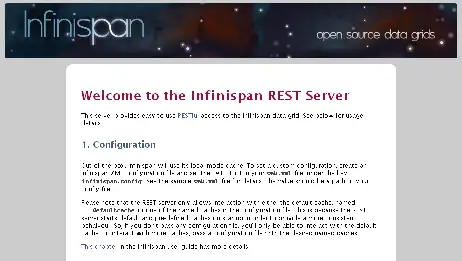
You will hit a welcome page which describes how basically the REST server works:
In order to insert elements in the cache, you can issue an HTTP PUT and POST request.
PUT /{cacheName}/{cacheKey}
POST /{cacheName}/{cacheKey}
In order to retrieve elements from the cache you can use HTTP GET request:
GET /{cacheName}/{cacheKey}
In order to delete elements from the cache you can issue an HTTP DELETE request:
DELETE /{cacheName}/{cacheKey}
By default infinispan has just the “___defaultcache” registered, so if you want to try out of the box the REST server, just create a REST client.
Following here is a jQuery client which puts an entry in the cache:
<html>
<head>

<title>jQuery RESTful client performing PUT</title>
 <script src="http://ajax.googleapis.com/ajax/libs/jquery/1.5/jquery.min.js"></script>

 <script type="text/javascript">

$.ajax({
type: "PUT",
url: '/infinispan/rest/___defaultcache/bucket1',
data: "Data in cache",
success: function(response){
$("#mydiv").html(response);
}
});


 </script>

</head>
<body>
<div id="mydiv"><p> </p></div>
 </body>
</html>
And here’s the corresponding page which performs a get on the bucket1 key:
<html>
<head>
 <title>jQuery RESTful client performing GET</title>
 <script src="http://ajax.googleapis.com/ajax/libs/jquery/1.5/jquery.min.js"></script>

 <script type="text/javascript">

$.ajax({
type: "GET",
url: '/infinispan/rest/___defaultcache/bucket1',
data: "",
success: function(response){
 $("#mydiv").html(response);

}
});


 </script>

</head>
<body>
<div id="mydiv"><p> </p></div>
 </body>
</html>
Do I need to download jQuery to run this sample ? no at all. jQuery is accessed on the cloud via <script src=”http://ajax.googleapis.com/ajax/libs/jquery/1.5/jquery.min.js”></script>. If you cannot reach the web from there, of course download jquery.js and place it on the server’s path.
Found the article helpful? if so please follow us on Socials


