This tutorial discusses how to configure the default ports for WildFly and JBoss EAP through the various server releases. We will learn how to change a single port definition, such as the default 8080 port and how to shift all ports using a port offset.
WildFly / JBoss EAP default ports
JBoss EAP and WildFly use Socket Binding groups to configure the network ports, which are actively listening for incoming connections. In Standalone mode, there is a single Socket Binding Group which defines all port settings:
    <socket-binding-group name="standard-sockets" default-interface="public" port-offset="${jboss.socket.binding.port-offset:0}">
        <socket-binding name="management-http" interface="management" port="${jboss.management.http.port:9990}"/>
        <socket-binding name="management-https" interface="management" port="${jboss.management.https.port:9993}"/>
        <socket-binding name="ajp" port="${jboss.ajp.port:8009}"/>
        <socket-binding name="http" port="${jboss.http.port:8080}"/>
        <socket-binding name="https" port="${jboss.https.port:8443}"/>
        <socket-binding name="txn-recovery-environment" port="4712"/>
        <socket-binding name="txn-status-manager" port="4713"/>
        <outbound-socket-binding name="mail-smtp">
            <remote-destination host="localhost" port="25"/>
        </outbound-socket-binding>
    </socket-binding-group>
For example, if you want to change the default 8080 port for the HTTP Server, you can pass the jboss.http.port attribute as System Property:
$ ./standalone.sh -Djboss.http.port=8090
Most of the times, it is preferable to define an offset for all ports. You can do that through the jboss.socket.binding.portoffset attribute which shifts all port definitions of a fixed number. For example, to declare an offset of 100, start the application server as follows:
$ ./standalone.sh -Djboss.socket.binding.port-offset=100
The corresponding interfaces used to bind the ports are defined by the default-interface attribute. Here are the default interfaces available:
    <interfaces>
        <interface name="management">
            <inet-address value="${jboss.bind.address.management:127.0.0.1}"/>
        </interface>
        <interface name="public">
            <inet-address value="${jboss.bind.address:127.0.0.1}"/>
        </interface>
    </interfaces>
When you are running in Domain mode, there are multiple Socket Binding Groups which you can assign to a Server group:
<server-group name="main-server-group" profile="full-ha">
    <socket-binding-group ref="full-ha-sockets"/>
</server-group>
In the above example, the main-server-group uses the full-ha-sockets configuration:
<socket-binding-group name="full-ha-sockets" default-interface="public">
    <socket-binding name="ajp" port="${jboss.ajp.port:8009}"/>
    <socket-binding name="http" port="${jboss.http.port:8080}"/>
    <socket-binding name="https" port="${jboss.https.port:8443}"/>
    <socket-binding name="iiop" interface="unsecure" port="3528"/>
    <socket-binding name="iiop-ssl" interface="unsecure" port="3529"/>
    <socket-binding name="jgroups-mping" interface="private" port="0" multicast-address="${jboss.default.multicast.address:230.0.0.4}" multicast-port="45700"/>
    <socket-binding name="jgroups-tcp" interface="private" port="7600"/>
    <socket-binding name="jgroups-tcp-fd" interface="private" port="57600"/>
    <socket-binding name="jgroups-udp" interface="private" port="55200" multicast-address="${jboss.default.multicast.address:230.0.0.4}" multicast-port="45688"/>
    <socket-binding name="jgroups-udp-fd" interface="private" port="54200"/>
    <socket-binding name="modcluster" port="0" multicast-address="224.0.1.105" multicast-port="23364"/>
    <socket-binding name="txn-recovery-environment" port="4712"/>
    <socket-binding name="txn-status-manager" port="4713"/>
    <outbound-socket-binding name="mail-smtp">
        <remote-destination host="localhost" port="25"/>
    </outbound-socket-binding>
</socket-binding-group>
Please notice that WildFly uses the port 9990 for all management interfaces (Web interface and CLI). On the other habd, EAP 6/ AS 7 uses the native port 9999 to communicate over the CLI.
How to find the JBoss Port number
If you cannot access the server configuration, a simple way to find which port the application server is using is the netstat command.
Firstly, check which is the PID of the application server:
ps -ef | grep jboss
Then, use the netstat command with the following set of options:
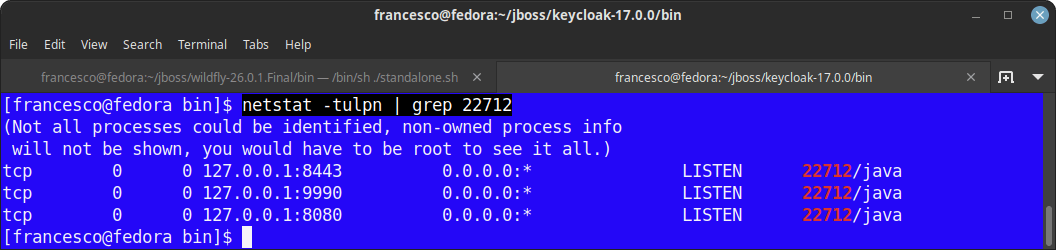
netstat -tulpn | grep <pid>
In this example, the application server is using the ports 8080, 9990 and 8443:
JBoss AS 5 Port settings
The JBoss AS port configuration file is located in conf\bindingservice.beans\META-INF\bindings-jboss-beans.xml. This file gathers port configuration information about both AS services and the Web server services.
Actually the release Community version JBoss AS 6.x of the application server provides a richer abstraction by removing port definitions also from the Web server configuration file (server.xml) which now contains an application server property
<Connector protocol="HTTP/1.1" port="${jboss.web.http.port}" address="${jboss.bind.address}"
 redirectPort="${jboss.web.https.port}" />

 <Connector protocol="AJP/1.3" port="${jboss.web.ajp.port}" address="${jboss.bind.address}"
 redirectPort="${jboss.web.https.port}" />
The single service ports are properties of the StandardBindings Bean.
<bean name="StandardBindings" class="java.util.HashSet">
   <constructor>
       <parameter class="java.util.Collection">
       <set elementClass="org.jboss.services.binding.ServiceBindingMetadata">


       <!-- Naming Service -->
       <bean class="org.jboss.services.binding.ServiceBindingMetadata">
         <property name="serviceName">jboss:service=Naming</property>
         <property name="bindingName">Port</property>
         <property name="port">1099</property>
         <property name="description">The listening socket for the Naming service</property>
       </bean>

. . . . . . . . . . . .

     </set>
     </parameter>
   </constructor>
 </bean>
Supposing we have bound JBoss AS to the IP Address 10.2.20.156, here’s the list of ports engaged by the application server:
Port       Description
-------------------------------------------------
1090       RMI/JRMP for Remote JMX

1091       RMI server socket

1098       Naming Service - RMI requests from client proxies

1099       Naming Service - Main port

3873       EJB3 Remoting Connector

4446       JBoss Remoting Connector - Unified Invoker

4712       JBossTS Recovery Manager

4713       JBossTS Transaction Status Manager

4714       JBossTS - used to create a unique process id

5445       HornetQ

5455       Socket for HornetQ throughput connection factory

5500       Non-SSL Remoting

5501       SSL Remoting

8009       AJP Port

8080       HTTP Port

8083       Dynamic class and resource loading
Clustered servers will additionally open the following ports:
1100  HA JNDI Service
1101  HA JNDI Service
3528  Corba IIOP Service
The Service Binding Manager
The Service Binding Manager co-ordinates which ports the JBoss Application Server instance listens on when it starts up and the Administration Console provides a mechanism for configuring this service to change which ports get used.
The Service Binding Manager can be used to change the default port sets, without changing the single service ports.
Out of the box, the JBoss Application Server 5 ships with four port sets:
* ports-default: The standard ports, for instance JBoss HTTP is on 8080.
* ports-01: The standard ports incremented by 100. For example, HTTP is on 8180
* ports-02: The standard ports incremented by 200. For example, HTTP is on 8280
* ports-03: The standard ports incremented by 300. For example, HTTP is on 8380
In order to change the port set you can edit the file bindings-jboss-beans.xml and set for example the ports-01
<parameter>${jboss.service.binding.set:ports-01}</parameter>
You can as well change the Service Binding ports from the start-up script of the application server. For example:
run -Djboss.service.binding.set=ports-01
This is pretty useful if you don’t have to maintain a separate copy of the all folder if you want to, say, start up multiple instances of JBoss running as a cluster.
You can change Port binding by means of the JBoss AS admin console: reach the Service Binding Manager thorough the path:
<machine> : JBossAS Servers : JBoss AS 6 (default) : Service Binding Manager.
Next go to its Configuration tab and for the Active Binding Set Name property enter the name of the new port set you wish the JBoss Application Server instance to use and hit the SAVE button at the bottom of the page.
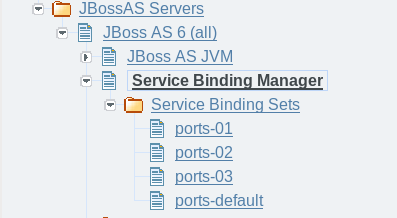
Select the Service Binding Sets folder from the navigation, hit the Add a new resource button on the main panel and enter in the necessary information.
Once you have updated the configuration for the Service Binding Manager, the JBoss Application Server instance must be restarted for those changes to take effect.
See the following article for more details about the error “java.net.BindException: Address already in use: JVM_Bind ” : Solving java.net.BindException: Address already in use: JVM_Bind
Found the article helpful? if so please follow us on Socials


