[Updated] In this article we will show how to reverse engineer your database schema into JPA/Hibernate Entity objects using JBoss Forge which is a free tool that enables to scaffold Java projects. It also enables to reverse engineer the Entities from the Database.
Installing Forge
Firstly, install JBoss forge as IDE plugin or as OS tool from https://forge.jboss.org/
Next, let’s start scaffolding a Database schema!
The Database schema
Next, we will use the Hibernate plugin for Forge and reverse engineer a MySQL database into the Java domain. Start by creating a database let’s say demoforge and add two tables in it, containing a One-To-Many relationship in it:
CREATE database demoforge;

USE demoforge;

CREATE TABLE department (
department_id INTEGER UNSIGNED NOT NULL AUTO_INCREMENT,
department_name VARCHAR(45) NOT NULL,
PRIMARY KEY (department_id)
);

CREATE TABLE employee (
employee_id INTEGER UNSIGNED NOT NULL AUTO_INCREMENT,
employee_name VARCHAR(45) NOT NULL,
employee_salary INTEGER UNSIGNED NOT NULL,
employee_department_id INTEGER UNSIGNED NOT NULL,
PRIMARY KEY (employee_id),
CONSTRAINT FK_employee_1 FOREIGN KEY FK_employee_1 (employee_department_id)
REFERENCES department (department_id)
ON DELETE CASCADE
ON UPDATE CASCADE
);
Here’s a view of our simple schema:

Now let’s start Forge:
/bin/forge
Then, create a new project (params are optional though you might add them to automate the project creation):
project-new --named demo-forge --stack JAVA_EE_7 --type war
A Web project named jpa-demo will be created, using the Java EE 7 API and defaults to Maven project structure. In order to enable reverse engineering we need at first set up the JPA with the jpa addon:
jpa-setup --data-source-name MySQLDS --db-type MYSQL
Now let’s reverse engineer out schema: (customize the Path where the JDBC Driver is located):
jpa-generate-entities-from-tables --jdbc-url jdbc:mysql://localhost/demoforge --user-name jboss --user-password jboss --driver-location /tmp/mysql-connector-java-5.1.18-bin.jar --hibernate-dialect org.hibernate.dialect.org.hibernate.dialect.MySQL5Dialect --driver-class com.mysql.jdbc.Driver --database-tables *
Adding an UI to our Project
So with the above command, we will reverse engine all tables contained in the schema demoforge into Entities. Good, now add some faces scaffolding for the GUI:
scaffold-generate --targets org.demo.forge.model.* --web-root demo-forge --provider Faces
Here is the project structure generated:
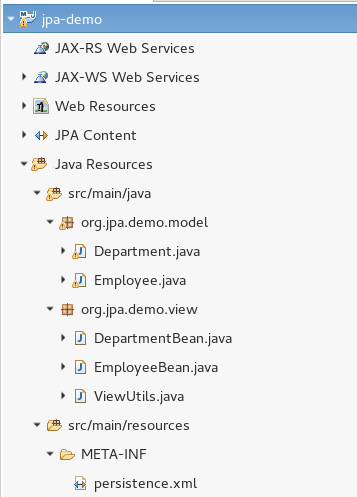
And this is the persistence.xml file that was automatically created:
<?xml version="1.0" encoding="UTF-8" standalone="no"?>
<persistence xmlns="http://java.sun.com/xml/ns/persistence" xmlns:xsi="http://www.w3.org/2001/XMLSchema-instance" version="2.0" xsi:schemaLocation="http://java.sun.com/xml/ns/persistence http://java.sun.com/xml/ns/persistence/persistence_2_0.xsd">
  <persistence-unit name="forge-default" transaction-type="JTA">
    <description>Forge Persistence Unit</description>
    <provider>org.hibernate.ejb.HibernatePersistence</provider>
    <jta-data-source>java:/MySQLDS</jta-data-source>
    <exclude-unlisted-classes>false</exclude-unlisted-classes>
    <properties>
      <property name="hibernate.hbm2ddl.auto" value="create-drop"/>
      <property name="hibernate.show_sql" value="true"/>
      <property name="hibernate.format_sql" value="true"/>
      <property name="hibernate.transaction.flush_before_completion" value="true"/>
    </properties>
  </persistence-unit>
</persistence>
For the sake of completeness we include a sample JBoss MySQL datasource:
<datasources xmlns="http://www.jboss.org/ironjacamar/schema">
<datasource jndi-name="java:jboss/datasources/MySqlDB" pool-name="MySQLPool">
    <connection-url>jdbc:mysql://localhost:3306/demoforge</connection-url>
    <driver>mysql-connector-java-5.1.18-bin.jar</driver>
    <pool>
        <max-pool-size>30</max-pool-size>
    </pool>
    <security>
        <user-name>jboss</user-name>
        <password>jboss</password>
    </security>
</datasource>
</datasources>
The Generated Entity Classes
Finally, here are the generated classes for the Entities Department.java and Employee.java
import java.util.HashSet;
import java.util.Set;
import javax.persistence.Column;
import javax.persistence.Entity;
import javax.persistence.FetchType;
import javax.persistence.GeneratedValue;
import static javax.persistence.GenerationType.IDENTITY;
import javax.persistence.Id;
import javax.persistence.OneToMany;
import javax.persistence.Table;

@Entity
@Table(name = "department", schema = "hibernate")
public class Department implements java.io.Serializable
{

   private Long departmentId;
   private String departmentName;
   private Set<Employee> employees = new HashSet<Employee>(0);

   public Department()
   {
   }

   public Department(String departmentName)
   {
      this.departmentName = departmentName;
   }

   public Department(String departmentName, Set<Employee> employees)
   {
      this.departmentName = departmentName;
      this.employees = employees;
   }

   @Id
   @GeneratedValue(strategy = IDENTITY)
   @Column(name = "department_id", unique = true, nullable = false)
   public Long getDepartmentId()
   {
      return this.departmentId;
   }

   public void setDepartmentId(Long departmentId)
   {
      this.departmentId = departmentId;
   }

   @Column(name = "department_name", nullable = false, length = 45)
   public String getDepartmentName()
   {
      return this.departmentName;
   }

   public void setDepartmentName(String departmentName)
   {
      this.departmentName = departmentName;
   }

   @OneToMany(fetch = FetchType.LAZY, mappedBy = "department")
   public Set<Employee> getEmployees()
   {
      return this.employees;
   }

   public void setEmployees(Set<Employee> employees)
   {
      this.employees = employees;
   }

}
import javax.persistence.Column;
import javax.persistence.Entity;
import javax.persistence.FetchType;
import javax.persistence.GeneratedValue;
import static javax.persistence.GenerationType.IDENTITY;
import javax.persistence.Id;
import javax.persistence.JoinColumn;
import javax.persistence.ManyToOne;
import javax.persistence.Table;

@Entity
@Table(name = "employee", schema = "hibernate")
public class Employee implements java.io.Serializable
{

   private Long employeeId;
   private Department department;
   private String employeeName;
   private int employeeSalary;

   public Employee()
   {
   }

   public Employee(Department department, String employeeName, int employeeSalary)
   {
      this.department = department;
      this.employeeName = employeeName;
      this.employeeSalary = employeeSalary;
   }

   @Id
   @GeneratedValue(strategy = IDENTITY)
   @Column(name = "employee_id", unique = true, nullable = false)
   public Long getEmployeeId()
   {
      return this.employeeId;
   }

   public void setEmployeeId(Long employeeId)
   {
      this.employeeId = employeeId;
   }

   @ManyToOne(fetch = FetchType.LAZY)
   @JoinColumn(name = "employee_department_id", nullable = false)
   public Department getDepartment()
   {
      return this.department;
   }

   public void setDepartment(Department department)
   {
      this.department = department;
   }

   @Column(name = "employee_name", nullable = false, length = 45)
   public String getEmployeeName()
   {
      return this.employeeName;
   }

   public void setEmployeeName(String employeeName)
   {
      this.employeeName = employeeName;
   }

   @Column(name = "employee_salary", nullable = false)
   public int getEmployeeSalary()
   {
      return this.employeeSalary;
   }

   public void setEmployeeSalary(int employeeSalary)
   {
      this.employeeSalary = employeeSalary;
   }

}
Deploying the project to WildFly can be easily achieved by adding to your pom.xml the Maven’s WildFly plugin
<plugin>
    <groupId>org.wildfly.plugins</groupId>
    <artifactId>wildfly-maven-plugin</artifactId>
    <version>4.0.0.Final</version>
    <configuration>
        <filename>${project.build.finalName}.war</filename>
    </configuration>
</plugin>
Conclusion
In conclusion, JBoss Forge provides a powerful toolset for reverse engineering database tables, enabling developers to quickly generate JPA entity classes based on an existing database schema. This process streamlines the development workflow by automating the creation of entity classes and their mappings, saving significant time and effort.
With JBoss Forge, developers can seamlessly connect to various databases, including MySQL, PostgreSQL, and Oracle, and easily generate JPA entities with the appropriate annotations and relationships. The intuitive command-line interface of JBoss Forge simplifies the process, allowing developers to focus on the core functionalities of their applications rather than dealing with manual entity creation.
Found the article helpful? if so please follow us on Socials


