the “java.net.BindException: Address already in use: JVM_Bind” error is a common challenge when working with Java applications. This error indicates that another process is using the network address and port, preventing your application from binding to it. In this tutorial, we will explore effective solutions to overcome this error and get your Java application up and running smoothly.
Resolving address conflicts in JBoss
The error “java.net.BindException: Address already in use: JVM_Bind” is not peculiar of a particular Java service however here is how it looks like when you try to start JBoss or WildFly:
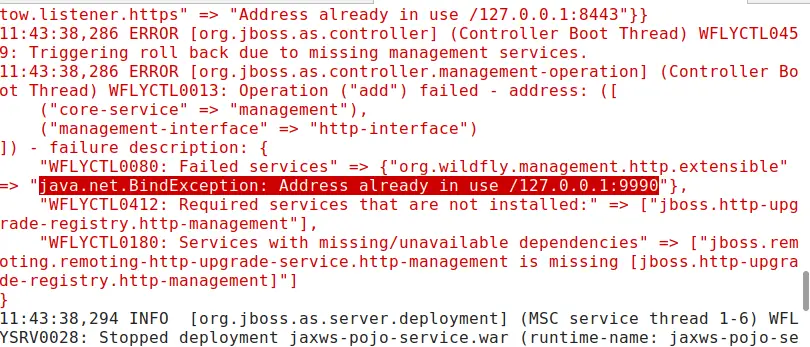
The most likely option is that you have still one instance of JBoss running, maybe because of an unclean shutdown. The “jps” command, which is available in every Java distribution, can quickly show all Java processes which are running:
$ jps
104503 Jps
102474 jboss-modules.jar
As you can see, there’s one Java process which makes uses of “jboss-modules.jar”. The application server binds to a number of network ports depending on the profile of JBoss / WildFly that you are using.
For example, an HA Profile will use the following bindings:
<socket-binding-group name="standard-sockets" default-interface="public" port-offset="${jboss.socket.binding.port-offset:0}">
        <socket-binding name="ajp" port="${jboss.ajp.port:8009}"/>
        <socket-binding name="http" port="${jboss.http.port:8080}"/>
        <socket-binding name="https" port="${jboss.https.port:8443}"/>
        <socket-binding name="jgroups-mping" interface="private" multicast-address="${jboss.default.multicast.address:230.0.0.4}" multicast-port="45700"/>
        <socket-binding name="jgroups-tcp" interface="private" port="7600"/>
        <socket-binding name="jgroups-tcp-fd" interface="private" port="57600"/>
        <socket-binding name="jgroups-udp" interface="private" port="55200" multicast-address="${jboss.default.multicast.address:230.0.0.4}" multicast-port="45688"/>
        <socket-binding name="jgroups-udp-fd" interface="private" port="54200"/>
        <socket-binding name="management-http" interface="management" port="${jboss.management.http.port:9990}"/>
        <socket-binding name="management-https" interface="management" port="${jboss.management.https.port:9993}"/>
        <socket-binding name="modcluster" multicast-address="${jboss.modcluster.multicast.address:224.0.1.105}" multicast-port="23364"/>
        <socket-binding name="txn-recovery-environment" port="4712"/>
        <socket-binding name="txn-status-manager" port="4713"/>
        <outbound-socket-binding name="mail-smtp">
            <remote-destination host="${jboss.mail.server.host:localhost}" port="${jboss.mail.server.port:25}"/>
        </outbound-socket-binding>
</socket-binding-group>
That being said, the most common cause is another WildFly server that is engaging the http port (8080) or the management port (9990).
If this WildFly process is the result of an unclean shutdown, you can simply stop it with an OS command such as ‘kill -9’. For example, to kill the process 102474:
kill -9 102474
On the other hand, if your application server needs to coexist with the existing WildFly server, then you can start it with a port offset, by setting the jboss.socket.binding.port-offset property.
For example:
./standalone.sh -Djboss.socket.binding.port-offset=100
When running in Domain mode the Port Offset configuration should be done through the Management Interfaces. We recommend checking this article to learn more: How to configure WildFly in Domain mode
Addressing the JVM_Bind Error
If you are not blocking the port with another WildFly server then you need to find which process is doing it. There are several command line tools both in Unix and Windows that you can use for this purpose.
Unix users:
In most Linux distributions you can use the following command to find PID-Process Name information for one user:
$ netstat -tulpn | grep 8080
tcp 0 0 127.0.0.1:8080 0.0.0.0:* LISTEN 22005/java
Another powerful tool is fuser which can check the processes using TCP/UDP sockets. Here is how to check which process binds a TCP Socket on port 8080:
$ fuser -v -n tcp 8080
Windows users:
You can use netstat to get network information for all processes. In the following example we make a filter on port 8080:
netstat -ano | find "8080"
You will be able to detect the process that is engaging your Port. Assuming that your PID is 1234, in order to kill it you can execute:
taskkill -pid 1234 /f
You can also use the TaskManager to kill your process. Mind it: by default the Task Manager doesn’t show the PID. You have to add it from the menu View | Select columns)
If you are using older versions of JBoss, chances are that MS Office or MS OfficeCommunicator are engaging port 1098 and 1099. If you don’t want to shut down these tools then your only option is using a different bind address
Mac Users:
Find pid by executing from the Terminal:
lsof -i:<port>
Kill the process with:
kill <pid>
Allow sufficient time for resource release
This is a scenarios where the previous process takes some time to shut down completely. You con implement a delay or retry mechanism during application startup to allow the previous process to release the address and port.
In some cases, you might want to adjust TIME_WAIT state duration. Modify the TCP/IP settings on your operating system to reduce the duration of the TIME_WAIT state. This allows the address and port to become available for reuse more quickly.
On a Linux machine, check the current value of the net.ipv4.tcp_tw_reuse parameter by running the following command:
sysctl net.ipv4.tcp_tw_reuse
- If the value is already set to
1, it means that TCP connections in TIME_WAIT state can be reused. In this case, you may not need to make any further adjustments. - If the value is set to
0, indicating that TCP connections in TIME_WAIT state are not being reused, you can change it by running the following command:
sudo sysctl -w net.ipv4.tcp_tw_reuse=1
java.net.BindException: Cannot assign requested address:
This means that you probably are not using a correct address for one of your network interfaces configured in the application server. If you boot the application server assigning an host name:
$ ./standalone.sh -b hostname
Then the file /etc/host in both Windows and Linux is used to resolve domain name into IP address, if this mapping is incorrect than you will get java.net.BindException: Cannot assign requested address: JVM_Bind.
Conclusion
By following the solutions and techniques outlined in this tutorial, you can effectively tackle the “java.net.BindException: Address already in use: JVM_Bind” error. Understanding the causes, identifying the conflicting process, and implementing appropriate remedies will ensure smooth and uninterrupted execution of your Java applications. Remember to regularly monitor and optimize your application’s network resource usage to prevent recurrence of this error.
See also this tutorial for more information about JBoss port configuration.
Found the article helpful? if so please follow us on Socials


