What is JBoss Farming Service?
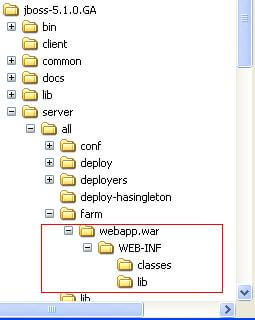
all/farm/ directory of any cluster member and the application will be automatically deployed across all nodes in the same cluster.farm/ directory, the application will be undeployed locally and then removed from all other clustered server nodes’ farm/ directories.farm-service.xml configuration file. This file is located in the deploy/deploy.last directory:<bean name="FarmProfileRepositoryClusteringHandler"
class="org.jboss.profileservice.cluster.repository.
DefaultRepositoryClusteringHandler">
<property name="partition"><inject bean="HAPartition"/></property>
<property name="profileDomain">default</property>
<property name="profileServer">default</property>
<property name="profileName">farm</property>
<property name="immutable">false</property>
<property name="lockTimeout">60000</property><!-- 1 minute -->
<property name="methodCallTimeout">60000</property><!-- 1 minute -->
<property name="synchronizationPolicy"><inject bean="FarmProfileSynchronizationPolicy"/></property>
</bean>
-
partition is a required attribute to inject the HAPartition service that the farm service uses for intra-cluster communication.
-
profile[Domain|Server|Name] are all used to identify the server profile.
-
immutable indicates whether or not this handler allows a node to push content changes to the cluster.
-
lockTimeout defines the number of milliseconds to wait for cluster-wide lock acquisition.
-
methodCallTimeout defines the number of milliseconds to wait for invocations on remote cluster nodes.
-
synchronizationPolicy decides how to handle content additions, reincarnations, updates, or removals from nodes attempting to join the cluster or from cluster merges. The policy is consulted on the “authoritative” node, i.e. the master node for the service on the cluster. Reincarnation refers to the phenomenon where a newly started node may contain an application in its
farm/directory that was previously removed by the farming service but might still exist on the starting node if it was not running when the removal took place.
Advanced features
In the 4.X release of JBoss the farming service was available only for archive deployment. With the new release you can safely deploy exploded deployments too.
In the release 4.X each time a new node joined the cluster, it received a copy of the content of the farm directory even if the application was already deployed on it. This needless operation has been eliminated in the release 5.1.0
3# Deploy and farming service are now synchronized
In the earlier release if you removed a deployment unit from the deploy folder and not from the farm directory, at next startup the application would have been redeployed again. Tbis has been corrected in JBoss AS 5.1.0
How to replace the farming service in WildFly
If you are running WildFly or JBoss EAP 6/7 the Farming Service is not available any more. The recommended way to distribute applications to your cluster using a single distribution point is to switch to Domain mode and use management instruments.
This way, you will be able to deploy/undeploy your applications to a Server Group in a similar way you used to do with the Farming Server, although you will be using Management Instruments such as the CLI and Web Console.
Read more here:
How to deploy applications on WildFly
If your applications will be running on the Cloud, we suggest checking this tutorial
Building and deploying a Jakarta EE application on OpenShift


