Have you completed the BPMN introduction tutorial? In this second part tutorial we will discuss about the two other core BPMN elements: Activities and Gateways.
An activity, represented with a rounded-corner rectangle, describes a kind of work which must be done. It commonly includes Tasks and Subprocesses.
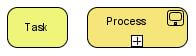
BPMN Tasks
A BPMN Task is essentially an activity which needs to be performed either by a human actor or automatically. Prior to BPMN 2.0 the only way to understand what type of task is was look at in the lanes in the pool, or using a text annotation to clarify the intent of the digram. BPMN 2.0 adds new icon annotations to the tasks. These icons might differ a bit depending on the BPMN software you are using, however I encourage you to use them because it brings a lot of clarity to a diagram.
Let’s see all type of tasks available:
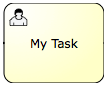 |
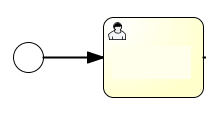
Human task | A human task is a task that requires intervention by a human (actor). For example the user fills up a form and submit his work to the manager. |
 |
Manual task | A human task which is to be performed without the aid of any business process execution or any application. Example: phone call |
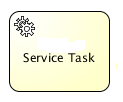 |
Service task | Represents an automated unit of work that should be executed in this process. All work that is executed outside the process engine should be represented (in a declarative way) using a Service Task. |
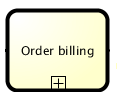 |
Call Activity | Represents a reusable global task or process. Call activity references a process that is external to the process definition, whereas the subprocess is embedded within the original process definition. |
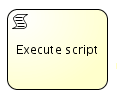 |
Script Task | A script task is an automatic activity. When a process execution arrives at the script task, the corresponding script is executed. |
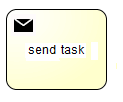 |
Send Task | A simple task that is designed to send a message to an external participant (relative to the process). Once the message has been sent, the task is completed. |
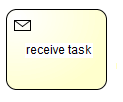 |
Receive Task | A simple task that is designed to wait for a message from an external participant (relative to the process). Once the message has been received, the task is completed. |
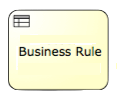 |
Business rule task | Provides a mechanism for the process to provide input to a business rule engine and to get the output of calculations that the business rules engine might provide. In the process model it does not take any action. It just returns the rule result, which can be used by subsequent process logic in a variety of ways. |
Sub-Processes
Sub-Processes are a very handy concept in BPMN. Besides providing a natural way to draw a condensed top-down view with drill-down to any level of detail, BPMN subprocesses also determine the boundaries of when an event can be received – a change to an order in process, for example.
In terms of graphical aspect, a Sub-Process object shares the same shape as the Task object, which is a rounded rectangle. The Sub-Process can be in a collapsed view that hides its details (see picture)
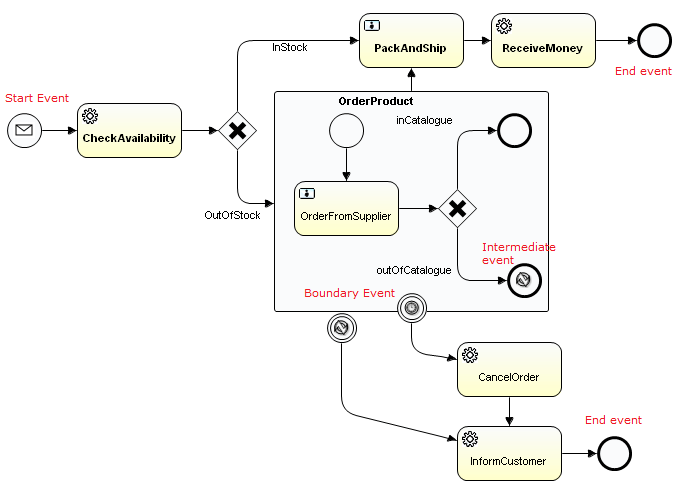
A Sub-Process can be in an expanded view that shows its details within the view of the Process in which it is contained. Here is an example of Sub-Process (“OrderProduct”) which is part of an Inventory system. The subprocess is used to model and hide the complexity of the refurnish subprocess and to issue an Exception if goods cannot be ordered in time.
Gateways
A gateway is used to control the flow of execution (or as the BPMN 2.0 describes, the tokens of execution). A gateway is capable of consuming or generating tokens.
Gateways can define all the types of business process Sequence Flow behavior: Decisions/branching (exclusive, inclusive, and complex), merging, forking, and joining. A gateway is graphically visualized as a diamond shape, with an icon inside. BPMN, however, extends the behavior of the diamonds to reflect any type of Sequence Flow control. Each type of Gateway will have an internal indicator or marker to show the type of Gateway that is being used.
The following table summarizes the most common gateways used in a business process:
 |
Exclusive Gateway | Used to model a decision in the process. Only one sequence flow is selected when using the exclusive gateway. In case multiple sequence flow have a condition that evaluates to true, the first one defined in the XML is selected for continuing the process. |
 |
Parallel Gateway | Allows to fork into multiple paths of execution or join multiple incoming paths of execution. When used to fork the sequence flow, all outgoing branches are activated simultaneously. When joining parallel branches it waits for all incoming branches to complete before moving to the outgoing flow |
 |
Inclusive Gateway | Inclusive gateway is also a division point of the business process. Unlike the exclusive gateway, inclusive gateway may trigger more than 1 out-going paths. Thus, all out-going conditions will be evaluated no matter has fulfilled out-going flow or not. |
Sequence Flows
A sequence flow is the connector between two elements of a process. After an element is visited during process execution, all outgoing sequence flow will be followed. A sequence flow is visualized as an arrow going from the source element towards the target element. The arrow always points towards the target.
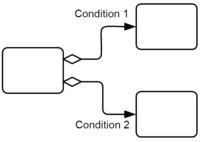
A Sequence Flow MAY have a conditional expression attribute, depending on its source object. This means that the condition expression must be evaluated before a Token can be generated and then leave the source object to traverse the Flow. The conditions are usually associated with Decision Gateways, but can also be used with activities.
All BPMN 2.0 tasks and gateways can have a default sequence flow. This sequence flow is only selected as the outgoing sequence flow for that activity if and only if none of the other sequence flow could be selected. Conditions on a default sequence flow are always ignored.
A default sequence flow is visualized as a regular sequence flow, with a ‘slash’ marker at the beginning.

We have completed our whirlwind tour of BPMN from the basics to more complex constructores. More resources about BPM are available in our Site Menu (BPM).
Found the article helpful? if so please follow us on Socials


